Blue Link: Axioo

Free Download ~ Info ~ Etc

Ads 728x90

Tampilkan postingan dengan label Axioo. Tampilkan semua postingan
DriverPack Solution terbaru Mei 2026, versi 17.10.14-25060
Jumat, Mei 01, 2026
DriverPack Solution 17 – a DVD version of the most powerful manager for automated driver installation. Scans your computer hardware and offer to install/update the driver for all devices in Offline mode. DriverPack Solution simplifies the process of reinstalling Windows on any computer. No more problems with searching and installing drivers. Everything will be done in a couple of mouse clicks!

SamLab(he’s a person) makes driverpacks for his SamDrivers and the same driverpacks are also used by DriverPack Solution. SamDrivers includes 3 applications for driver installation as opposed to only one in DriverPack Solution. It should be noted that SamDrivers’s edition of DriverPack Solution is modified: expert mode is enabled by default, disabled downloading and executing of a JS script from the Internet, removed some bloatware, etc. Since some bloatware isn’t available in English, so you’re better off using SamDrivers anyway.

Features:
Advantages DriverPack Solution:
• Automated driver installation: The program installs all required drivers to any computer in just about 5 minutes.
• Saves Time and money: No more wasting time on looking for drivers; all required drivers will be installed with only a few clicks.
• Any driver for any computer
* All drivers on a single DVD!
* Simplifies downloading new drivers from the Internet.
• Drivers update capability: Updates previously installed drivers to their latest versions.
• Windows 8 / 7 / Vista / XP
* Supports all modern operating systems!
* Both 64-bit and 32-bit versions!
• Easy to use: Simple and foolproof interface.
• Customization ability: Our program is open source software.
• Distributed for FREE: Under the GNU GPL license.

Program is used:
• home computer users
• System Administrators
• Computer Wizard
• Service for computer repair
• other people who are often faced with installing / reinstalling Windows

Pros of using:
• interface is friendly and intuitive
• intelligent technology classification drivers
• Multiple installation options (for the professional to the novice user)
• multilingualism (does not require linguistic knowledge and effort): English, Russian, Ukrainian, German, French, Italian, Spanish, Turkish, Azeri, Dutch, Lithuanian etc…
• Check the availability of new versions of software

The program is suitable for all models of computers. That includes drivers for laptops:
Acer, ASUS, HP, Dell, MSI, Samsung, Toshiba, Sony, Lenovo, Fujitsu, Fujitsu Siemens, eMachines, Packard Bell, Clevo, BenQ, Notebook, IBM, Apple, Intel, LG, Compaq, Depo, NEC, Gericom, Matsushita, Medion, K-Systems, Gigabyte, SiS, Gateway.

 It will help download free drivers for:
Motherboard, sound card (audio), Video Card, Network Card, Wi-Fi, chipset, controller, Bluetooth (bluetooth), Modem, Web-camera, card reader, CPU, input devices, monitor, printer, scanner, USB, Other …


Download DriverPack Online  : Download <<< | 17.11 .108 | 8,55 MB |
It is downloaded instantly, downloads and installs all drivers if you have Internet connection
 
DriverPack Offline Network  : Download <<< | 17.10.14-25091 | 888 MB | exe-driverpack | Torrent | Turbobit.net | Uploadrar.com | up-load.io |
It contains drivers for network hardware (Lan/Wi-Fi), it operates without connection to Internet

 Download DriverPack Full Link (Torrent) : Download <<< | 17.10.14-25060 | 47 GB | Torrent | Turbobit.net | Gigabase.com |
It contains all drivers, operates without connection to Internet, it can be downloaded through the Torrent-tracker

[Link] Bagi yang ingin menginstal App bawaan ASUS manual
Kamis, Juni 01, 2023

Bagi yang ingin menginstal App bawaan ASUS manual, silahkan download disini :
Nama App | Versi | Ukuran | Android :
App Lock |
  | 1.0.0.140805 | 1,61 MB | 4.0 ~ 4.4 |

• Armoury Crate |
  | 1.0.98 |  6,85 MB | 8.0 ~ 8.1 |
  | 3.5.0.69_201202 | 39,1 MB | 9.0 |
  | 5.10.0.62_210317 | 105,04 MB | 10.0 |
  | 5.60.0.38_220412 | 118,04 MB | 10.0 |

ASUS AudioWizard |
  | 2.0.0.45_160921 |  4,41 MB | 4.4 ~ 6.0 |
  | 6.0.0.42S43_171016 | 4,08 MB | 4.4 ~ 7.0 |
  | 8.0.0.27_190508 | 7,88 MB | 8.0 |
  | 9.0.0.32_190617 | 8,2 MB | 9.0 |
  | 10.1.0.8_200429 | 8,32 MB | 10 |

ASUS Backup |
  | 1.1.0.62_160603 | 5,16 MB | 4.3 ~ 6.0 |

ASUS Browser |
  | 2.1.2.85_170911 | 16,24 MB | 4.4 ~ 6.0 |

ASUS Calculator - unit converter |
  | 1.5.0.95_161014 beta | 4,47 MB | 4.1 ~6.0 |
  | 1.7.0.33_170217 | 6,08 MB | 4.4 ~ 7.0 |
  | 5.0.0.2_180312 | 4,7 MB | 5.0 ~ 7.1 |
  | 5.0.0.24_181004 | 4,72 MB | 7.0 ~ 8.0 |
  | 6.0.0.15_190613 | 5,77 MB | 7.0 ~ 8.0 |
  | 7.4.0.7_210325 | 4,89 MB | 8.1 ~ 9.0 |
  | 8.0.0.16_210325  | 4,61 MB | 8.1 ~ 10 | 
  | 8.1.0.6_211102 | 5,12 MB | 8.1 ~ 10 | 
  | 9.0.0.12_220613 | 5,01 MB | 8.1 ~ 12 | 
  | 10.0.0.16_230508 | 6,42 MB | 12 ~ 13 | 

ASUS Calendar |
  | 2.1.0.57_160729 beta | 8,2 MB | 4.3 ~ 6.0 |

ASUS Calling Screen |
  | 1.7.0.13_160224 | 12,56 MB | 5.0 |
  | 25.0.0.13_170524 | 7,67 MB | 6.0 ~ 7.1 |
  | 25.1.0.33_180226 | 7,17 MB | 7.0 ~ 8.0 |
  | 26.0.0.50_180709 | 4,49 MB | 8.0 ~ 8.1 |
  | 29.0.0.15_200708 | 8,81 MB | 9.0 |
  | 30.0.0.27_211118  | 7,3 MB | 10 ~ 11 |
  | 31.1.0.10_220322 | 8,28 MB | 10 ~ 11 |

ASUS Contacts Widget |
  | 1.1.0.140619 | 0,61 MB | 4.0 |

• ASUS Cover 3.0 for ZenFone 3  |
  | 1.0.0.111_180726 | 23,09 MB | 6.0 ~ 7.0 |

ASUS Cover for Zenfone 2  |
  | 2.0.0.34_160815 | 9,88 MB | 5.0 ~ 6.0 |

• ASUS Data Transfer |
  | 2.048.097 | 11,08 MB | 4.4 ~ 8.0 |
  | 3.122.260.66 | 32,53 MB | 4.4 ~ 9.0 |
  | 4.211.634.130 | 16,36 MB | 6.0 ~ 13 |

ASUS Device Discovery  |
  | 1.0.0.1.10 | 3,55 MB | 3.0 ~ 5.0 | 

ASUS Digital Clock & Widget |
  | 2.1.0.39_170411 | 13,32 MB | 4.2 ~ 7.0 |
  | 3.0.0.35_180117 | 11,01 MB | 5.0 ~ 7.1 |
  | 5.0.0.35_181109 | 11,62 MB | 7.0 ~ 7.1 |
  | 6.0.0.59_200210 | 13,75 MB | 7.0 ~ 8.0 |
  | 7.2.0.14_200924 | 11,72 MB | 7.0 ~ 9.0 |
  | 8.0.0.31_210224 | 13,43 MB | 8.0 ~ 10 | 
  | 8.1.0.11_211130 | 11,97 MB | 8.0 ~ 10 | 
  | 9.0.0.25_220613 | 12,07 MB | 8.0 ~ 12 | 

• ASUS Easy Mode (ZenFone & Pad)  |
  | 1.5.0.62S63_171228 | 0,78 MB | 4.2 ~ 6.0 |

ASUS Email |
  | 1.1.0.140612 | 4.97 MB | 4.2 ~ 4.3 |
  | 3.0.0.41_160722 | 9.7 MB | 4.3 ~ 6.0 |

ASUS Extender |
  | 1.0.0.1.17 | 7,77 MB | 4.3 ~ 5.1 | 

ASUS File Manager |
  | 2.0.0.397_180123 | 17,66 MB | 4.1 ~ 7.0 |
  | 2.2.0.249_180323 | 13,88 MB | 6.0 ~ 8.0 |
  | 2.3.1.59_181120 | 18,18 MB | 6.0 ~ 8.0 |
  | 2.4.2.12_200519 | 17,81 MB | 6.0 ~ 9.0 |
  | 2.5.1.15_210317 | 20,88 MB | 6.0 ~ 9.0 |
  | 2.6.0.41_210312 | 20,59 MB | 10-11 |
  | 2.7.0.8_211021 | 20,48 MB | 11 | 
  | 2.8.0.68_220812 | 19,34 MB | 12 | 
  | 2.8.0.85_230220 | 19,48 MB | 12+ | 

ASUS Flashlight |
  | 1.6.0.22_171204 | 2,63 MB | 4.2 ~ 7.1 |

ASUS FM Radio |
  | 1.5.0.44_160831 | 0,66 MB | 4.4 ~ 6.0 |  
  | 1.61.0.62_171027 | 0,68 MB | 7.0 ~ 8.0 |

ASUS Gallery |
  | 2.0.0.157_170712 | 49.3 MB | 4.3 ~ 7.0 |
  | 2.7.0.176_180402 | 30,96 MB | 7.0 ~ 8.0 |
  | 2.7.0.388_190425 | 74,88 MB | 8.0 |
  | 2.8.3.63_200511 | 55,59 MB | 8.0 ~ 9.0 |
  | 2.9.0.40_200716M | 74,88 MB | 8.0 ~ 9.0 |
  | 3.0.0.43_210129 | 59,84 MB | 8.0 ~ 10 |
  | 3.0.1.12_211115 | 56,74 MB | 8.0 ~ 10 |
  | 3.1.0.37_220311 | 58,41 MB | 8.0 ~ 10 |
  | 3.3.0.73_220614 | 56,42 MB | 8.0 ~ 12 |

ASUS Game Genie |
  | 1.0.0.68_161124 | 7,82 MB | 6.0 ~ 7.0 |
  | 2.1.0.35_180102 | 5,76 MB | 7.0 ~ 7.1 |
  | 5.0.0.73_190508 | 7,42 MB | 8.0 ~ 9.0 |
  | 6.0.0.50_201103 | 6,65 MB | 9.0 |
  | 6.3.0.88_201113 | 9,41 MB | 10 |
  | 8.0.0.82_210412 | 51,57 MB | 9.0 |
  | 8.5.0.25_211112 | 57,85 MB | 10 |
  | 8.6.0.41_220411 | 58,6 MB |12 |

• ASUS Graffiti Board |
  | 1.0.0.141127 | 0,55 MB | 4.0 ~ 4.2 |

ASUS Kids Mode |
  | 1.3.0.35_170313 | 5,22 MB | 5.0 ~ 7.0 |
  | 1.3.0.48_171101 | 5,22 MB | 5.0 ~ 8.0 |

• ASUS Laser Ruler |
  | 1.0.66.0_170509 | 0,46 MB | 4.4 ~ 6.0 |

• ASUS Lyra |
  | 1.0.0.0.30 | 33,79 MB | 5.0 ~ 7.0 |

ASUS Messaging |
  | 1.3.0.150306_2 | 5,41 MB | 4.4 |
  | 1.6.0.8_151204_beta | 6,75 MB | 5.0 ~ 6.0 |
  | 22.0.0.32_160818 | 6,66 MB | 5,1 ~ 6.0 |

ASUS MiniMovie |
  | 2.5.4.22S23_170112 | 14,6 MB | 4.3 ~ 7.0 |
  | 4.0.0.17_171129 | 23,3 MB | 5.0 ~ 8.0 |

ASUS Mirror |
  | 1.1.0.140619 | 0,13 MB | 4.3 ~ 4.4 |

ASUS Mobile Manager |
  | 4.1.20.0_180620 | 22,1 MB | 5.0 ~ 6.0 |
  | 4.7.2.1_170418 | 23,82 MB | 5.0 ~ 6.0 |
  | 5.0.15.0_180314 | 25,82 MB | 7.0 ~ 7.1 |
  | 6.5.10.3_190411 | 20,16 MB | 8.0 |
  | 6.6.9.4_190211 | 21,69 MB | 9.0 |
  | 8.0.0.25_200717 | 14,78 MB | 10 |
  | 9.0.0.62_210916 | 12,25 MB | 11 |
  | 9.1.0.18_220318 | 7,96 MB | 12 |

ASUS Music |
  | 1.5.0.150128_3 | 3.15 MB |  4.3 |
  | 2.0.0.47_151201 | 7.65 MB | 4.4 ~ 6.0 |
  | 2.1.0.40_161206 | 7,51 MB | 6.0 |

ASUS MyFrame |
  | 1.0.0.140910 | 5,77 MB | 3.1 ~ 4.2 |

ASUS Page Maker |
  | 1.3.0.59S61_180517 | 11,57 MB | 6.0 ~ 8.0 |

ASUS PixelMaster Camera |
  | 1.1.0.150126_6 | 13,4 MB | 4.4 |
  | 2.0.66.0_160616 | 2,98 MB | 4.4 ~ 6.0 |
  | 3.0.55.0_171003 | 33 MB | 4.4 ~ 7.0 |
  | 3.1.14.1_180126 | 33.16 MB | 4.4 ~ 8.0 |
  | 4.0.26.2_171027M | 2,27 MB | 7.0 ~ 7.1 |
  | 5.0.30.3_180920_2M  | 10,94 MB | 7.1 ~ 8.0 |
  | 6.3.12.0_200317  | 19,22 MB | 7.1 ~ 8.0 |
  | 8.3.6.0_210316  | 24,26 MB | 8.0 ~ 10 |
  | 8.17.1.0_220322 | 66,29 MB | 8.1 ~ 10 |

ASUS Playto |
  | 2.0.9.29_160322 | 0,34 MB | 5.0 ~ 6.0 |
  | 2.1.0.20S21_170825 | 1.4 MB | 7.0 ~ 7.1 |

ASUS Quick Memo |
  | 1.7.0.3_151026 | 1,26 MB | 4.2 ~ 4.4 |
  | 1.10.0.33_180403 | 1,58 MB | 5.0 ~ 8.0 |

ASUS Radiant Wallpaper |
  | 1.1.0.4_171025 | 23,24 MB | 5.0 ~ 7.0 |

ASUS Router |
  | 1.0.0.2.61 | 12,77 MB | 4.0 ~ 5.1 |
  | 1.0.0.2.70 | 21,43 MB | 4.3 ~ 5.1 |

ASUS Share Link  |
  | 1.6.0.90_161104 | 15,83 MB | 4.3 ~ 6.0 |
  | 1.7.0.53_170314 | 22,74 MB | 6.0 |

ASUS SmartHome  |
  | 1.3.103 | 12,51 MB | 4.4 ~ 5.0 |

  | 1.1.0.141224 | 2,88 MB | 4.0 ~ 4.2 |

ASUS Social Network Provider  |
  | 1.1.0.141217 | 0,35 MB | 4.0.3 ~ 4.2 |

ASUS Sound Recorder |
  | 1.5.0.1_150820 | 1,91 MB | 4.2 ~ 5.0 |
  | 1.7.0.27_180312 | 4,2 MB | 6.0 ~ 8.0 |
  | 1.9.0.38_181018 | 2,91 MB | 7.0 ~ 8.0 |
  | 2.0.0.11_181023  | 3,1 MB | 8.1 |
  | 3.0.0.19_200707  | 4,31 MB | 10 |
  | 4.0.0.19_210916 | 2,91 MB | 10 |
  | 4.5.0.16_211201 | 6,51 MB | 12 |
  | 5.0.0.65_220531 | 7,41 MB | 12 |

ASUS Splendid |
  | 1.5.0.38_170327 | 4,74 MB | 4.3 ~ 7.0 |
  | 1.8.0.20_180409 | 5,76 MB | 6.0 ~ 7.1 |
  | 2.0.0.11_191227 | 6,77 MB | 8.0 ~ 10 |
  | 1.16.0.10_210922 | 8,75 MB | 8.0 ~ 10 |
  | 1.17.0.8_211108 | 5,96 MB | 11 ~ 12 |
  | 1.18.0.2_220519 | 5,93 MB | 11 ~ 12 |

ASUS SuperNote |
  | 1.6.0.23_170208 | 21,27 MB | 5.0 ~ 6.0 |
  | 1.7.0.6_170330 | 21,53 MB | 7.0 |

• ASUS Task Manager widget |
  | 1.6.0.12_170602 | 0,85 MB | 4.3 ~ 5.0 |

ASUS Weather |
  | 2.0.0.46_160518 | 28,79 MB | 4.3 ~ 6.0 |
  | 3.0.0.76_161229 | 26,65 MB | 4.4 ~ 6.0 |
  | 5.0.1.11_181113 | 30,2 MB | 5.0 ~ 8.0 |
  | 6.0.0.66_190924 | 12,03 MB | 9.0 |
  | 7.1.0.23_200909  | 8,45 MB | 10 |
  | 8.1.0.2_210809 | 8,43 MB | 10-11 |
  | 8.2.0.24_220322 | 10,63 MB | 10-11 |
  | 9.1.0.25_220719 | 10,75 MB | 10-12 |

ASUS WebStorage |
  | 3.1.28.2 | 28,16 MB | 4.0.3 ~ 6.0 |

ASUS Webview |
  | 49.160408 | 35,79 MB | 5.0 ~ 6.0 |

ASUS What's Next |
  | 1.1.0.140825_10 | 9,39 MB | 3.2 ~ 4.4 |
  | 1.5.0.25_151117 | 13,62 MB | 5.0 |

ASUS ZenFit |
  | 3.2.2.170904 | 26,88 MB | 4.4 ~ 6.0 |

ASUS ZenTalk Community |
  | 2.1.35_20180115 | 4,53 MB | 4.4 ~ 8.0 | 
  | 2.2.56_20200407 | 2,98 MB | 5.0 ~ 9.0 | 

ASUS ZenUI |
  | 4.0.0.2_170801 | 0,76 MB | 5.0 ~ 6.0 |

ASUS ZenUI Keyboard |
  | 1.7.6.10_160805 | 42,1 MB | 4.2 ~ 6.0 | instal first &open for other device |
  | 1.7.9.87_171212 | 35,66 MB | 7.0 |
  | 1.7.10.2_180803 | 44,17 MB | 4.4 ~ 7.1 |

ASUS ZenUI Launcher |
  | 1.4.3.6_150925 | 10,84 MB | 4.1 ~ 5.0 |
  | 3.0.10.37_170707 | 15,79 MB | 4.3 ~ 7.0 |
  | 4.5.2.2_171113 | 15,7 MB | 7.0 ~ 8.0 |
  | 4.5.3.13_180420 | 15,49 MB | 8.0 |
  | 5.0.1.62_180903 | 14,39 MB | 8.0  + |
  | 5.5.2.19_181130_4 | 14,37 MB | 9 | 
  | 6.0.2.65_200629  | 16,03 MB | 10 | 
  | 7.0.1.66_200910 | 14,26 MB | 10 | 
  | 8.0.0.70_211007 | 14,26 MB | 11+ |  
  | 8.5.0.46_220413 | 17,05 MB | 12+ |  
  | 9.0.1.20_220617 | 17,46 MB | 12+ |  

ASUS ZenUI Services |
  | 2.45.0.161129 | 20,82 MB | 4.2 ~ 6.0 |

CloudStorage |
  | 1.2.0.140919 | 2,9 MB | 4.0.3 ~ 4.4 |

Cover View |
  | 1.1.0.150702 | 1,8 MB | 4.4 ~ 5.0 |

DayScene |
  | 1.1.0.141118 | 2,56 MB | 4.1 ~ 4.4 |

Dictionary |
  | 1.0.10 | 0,95 | 2.1 ~ 4.0 |

Do It Later: Tasks & To-Dos |
  | 2.16.0.11_171201 | 6,42 MB | 4.3 ~ 7.1 |

HomeCloud |
  | 2.2.0.8471 | 16,6 MB | 2.2 ~ 4.1 | 

LiveWater |
  | 1.2.0.150209 | 4,96 MB | 4.1 ~ 5.0 |

• Local backup |
  | 1.26.83.40 | 18,15 MB | 4.4 ~ 8.0 |
  | 1.50.192.58 | 16,39 MB | 6.0 ~ 9.0 |

MyASUS - Service Center |
  | 3.3.20 | 7,03 MB | 4.2 ~ 7.1 |
  | 4.3.8 | 7,26 MB | 6.0 ~ 10 |

PC Link |
  | 2.0.0.22_150909 | 3,73 MB | 5.0 |
  | 1.1.0.150116 | 0,45 MB | 4.3 ~ 5.0 |

Photo Collage - Layout Editor |
  | 1.8.0.170106_11 | 38,58 MB | 4.4 ~ 7.0 |
  | 1.8.0.170824_9 | 45,8 MB | 5.0 ~ 8.0 |

Remote Link (PC Remote) |
  | 1.2k.0.150730_AD | 8,73 MB | 4.0 ~ 6.0 |
  | 1.0.7 | 11,85 MB | 4.4 ~ 6.0 |

Story |
  | 1.1.0.140911 | 8,31 MB | 4.0 |

TUF Detective 2 |
  | 1.0.5 | 7,14 MB | 4.4 ~ 5.1 | 

ZenCircle - Photo Sharing |
  | 2.0.28.170816_01 | 21,41 MB | 4.4 ~ 6.0 |

ZenFlash Camera |
  | 1.0.83 | 3,96 MB | 4.0 ~ 6.0 | 

• ZeniMoji |
  | 1.0.0.37_180601 | 37,04 MB | 8.0 |

ZenUI Dialer & Contacts |
  | 1.5.0.151005 | 20,06 MB | 4.4 |
  | 2.0.4.24_170919 | 14,38 MB | 5.0 ~ 7.0 |
  | 2.0.5.40_170926 | 15,18 MB | 6.0 ~ 7.0 |
  | 3.0.3.43_180227 | 13,46 MB | 7.0 ~ 7.1 |
  | 4.5.3.6_181015 | 10,94 MB | 8.0 |
  | 5.0.4.2_190701  | 11,61 MB | 8.0 ~ 9.0 |
  | 6.0.3.2_200304 | 11,21 MB | 10 |
  | 7.0.0.40_200716 | 10,45 MB | 10 |
  | 8.0.1.18_210713 | 10,5 MB | 10 |
  | 8.5.0.7_210713 | 8,57 MB | 10 |
  | 8.9.0.3_210910 | 9,58 MB | 10 | 
  | 9.0.0.29_220614 | 11,29 MB | 10 ~ 12 |

ZenUI Help |
  | 2.2.0.129_170626 | 6,75 MB | 4.3 ~ 7.0 |
  | 2.3.0.131_180206 | 10,49 MB | 6.0 ~ 7.1 |

• ZenUI Safeguard |
  | 1.0.0.15_180129 | 6,89 MB | 7.0 ~ 7.1 |
  | 2.0.0.21_181005 | 7,09 MB | 8.1 |
  | 3.0.0.40_200514 | 6,57 MB | 8.1 ~ 9.0 |
  | 4.0.0.31_210910 | 5,19 MB | 10 |
  | 5.0.0.1_210301 | 6,35 MB | 8.1 ~ 10 |
  | 5.2.0.5_220330 | 4,42 MB | 8.1 ~ 10 |

ZenUI Themes |
  | 1.8.0.43_181026 | 7,51 MB | 5.0 ~ 8.0 |
  | 6.0.0.49_200522 | 9,51 MB | 7.0 ~ 9.0 |
  | 7.0.0.16_200717 | 9,12 MB | 7.0 ~ 9.0 |
  | 8.0.0.16_210217  | 8,45 MB | 7.0 ~ 10 | 
  | 8.0.0.50_211005 | 13,78 MB | 7.0 ~ 11 | 
  | 8.0.0.59_220331 | 16,22 MB | 11 |  
  | 9.0.0.20_220504 | 18,27 MB | 11 ~ 12 |

ZenWatch Manager |
  | 3.3.0.170828 | 54,63 MB | 4.3 ~ 6.0 |


Link-link tersebut di ambil dari APKMirror, di web tersebut kita juga bisa mengupload APK aplikasi android sendiri, tentunya disaring terlebih dahulu, seperti ASUS ZenUI Keyboard, yang tidak bisa langsung didownload di Playstore bisa diperoleh disini, sudah saya coba ke Android lain seperti : O**o, S***G, H***X, X***I, serta ZenUI launcher bawaan ASUS, perangkat2 kita jadi serasa memakai ASUS.

Tambahan :
• Untuk menginstal ASUS ZenUI Keyboard di Android lain, instal dahulu versi 1.7.6.10_160805, setting dan test keyboardnya, baru diupdate ke versi terbaru
• Setiap App diupload oleh user lainnya, jadi terdapat kendala bisa jadi perangkat tidak cocok / support
• Periksa OS yang didukung, jika terjadi ketidakcocokan / crash app, kembalikan ke versi semula dan update ke versi yang sesuai di Play Store, kemungkinan tidak cocok dengan perangkat yang dipakai
• Atau pilih versi lain dibagian bawah yang sesuai dengan OS ASUS yang lebih stabil
• Google Play Music memang disiapkan untuk Zenfone tipe terbaru, setelah saya coba di Zen 3 Max , ada beberpa fitur yang tidak berjalan, seperti Equalizernya
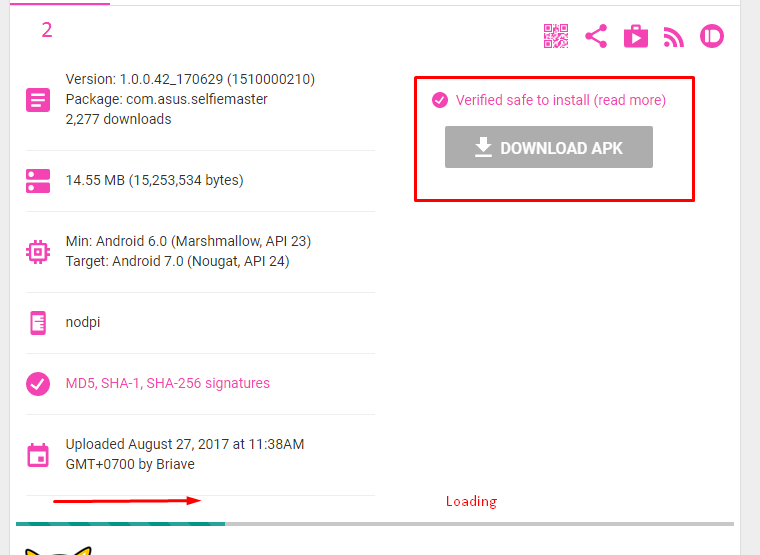
• Cara mendownload :


Contoh kecocokan OS, namun tidak semua perangkat ASUS pula mendukung, jika terjadi ketidakcocokan / crash app, kembalikan ke versi pabrik dan update ke versi yang sesuai di Play Store


DriverPack Solution Professional 14.14
Rabu, Januari 07, 2015


DriverPack Solution 14 – a DVD version of the most powerful manager for automated driver installation. Scans your computer hardware and offer to install/update the driver for all devices in Offline mode. DriverPack Solution simplifies the process of reinstalling Windows on any computer. No more problems with searching and installing drivers. Everything will be done in a couple of mouse clicks!

SamLab(he’s a person) makes driverpacks for his SamDrivers and the same driverpacks are also used by DriverPack Solution. SamDrivers includes 3 applications for driver installation as opposed to only one in DriverPack Solution. It should be noted that SamDrivers’s edition of DriverPack Solution is modified: expert mode is enabled by default, disabled downloading and executing of a JS script from the Internet, removed some bloatware, etc. Since some bloatware isn’t available in English, so you’re better off using SamDrivers anyway.

Features:
Advantages DriverPack Solution:
• Automated driver installation: The program installs all required drivers to any computer in just about 5 minutes.
• Saves Time and money: No more wasting time on looking for drivers; all required drivers will be installed with only a few clicks.
• Any driver for any computer
* All drivers on a single DVD!
* Simplifies downloading new drivers from the Internet.
• Drivers update capability: Updates previously installed drivers to their latest versions.
• Windows 8 / 7 / Vista / XP
* Supports all modern operating systems!
* Both 64-bit and 32-bit versions!
• Easy to use: Simple and foolproof interface.
• Customization ability: Our program is open source software.
• Distributed for FREE: Under the GNU GPL license.

Program is used:
• home computer users
• System Administrators
• Computer Wizard
• Service for computer repair
• other people who are often faced with installing / reinstalling Windows

Pros of using:
• interface is friendly and intuitive
• intelligent technology classification drivers
• Multiple installation options (for the professional to the novice user)
• multilingualism (does not require linguistic knowledge and effort): English, Russian, Ukrainian, German, French, Italian, Spanish, Turkish, Azeri, Dutch, Lithuanian etc…
• Check the availability of new versions of software

The program is suitable for all models of computers. That includes drivers for laptops:
Acer, ASUS, HP, Dell, MSI, Samsung, Toshiba, Sony, Lenovo, Fujitsu, Fujitsu Siemens, eMachines, Packard Bell, Clevo, BenQ, Notebook, IBM, Apple, Intel, LG, Compaq, Depo, NEC, Gericom, Matsushita, Medion, K-Systems, Gigabyte, SiS, Gateway.

 It will help download free drivers for:
Motherboard, sound card (audio), Video Card, Network Card, Wi-Fi, chipset, controller, Bluetooth (bluetooth), Modem, Web-camera, card reader, CPU, input devices, monitor, printer, scanner, USB, Other …

Install Notes:
1. Burn Iso or Mount It
2. Launch DriverPack Solution.

Download
Full Link (Torrent)
http://download.drp.su/DRP14.torrent

Part File
RAPIDGATOR
http://rapidgator.net/file/c40a54011a9b0589c42cde22ba638300/sHaRewbb_SamDRV1414.part1.rar.html
http://rapidgator.net/file/0094766d6101ad6e858eb56a5a11930f/sHaRewbb_SamDRV1414.part2.rar.html
http://rapidgator.net/file/64a19944c9909955c6bc7b543f5e077d/sHaRewbb_SamDRV1414.part3.rar.html
http://rapidgator.net/file/9fb6e1ec2d6dcbeb803ca28a7f90b2c6/sHaRewbb_SamDRV1414.part4.rar.html
http://rapidgator.net/file/ef9854aaa07837143dfcb4d3ec727c48/sHaRewbb_SamDRV1414.part5.rar.html
UPLOADED
http://uploaded.net/file/t09fkjg4/sHaRewbb_SamDRV1414.part1.rar
http://uploaded.net/file/803w7eyo/sHaRewbb_SamDRV1414.part2.rar
http://uploaded.net/file/edki8tem/sHaRewbb_SamDRV1414.part3.rar
http://uploaded.net/file/lgtgxapw/sHaRewbb_SamDRV1414.part4.rar
http://uploaded.net/file/1pvxrimd/sHaRewbb_SamDRV1414.part5.rar
UPLOADABLE
http://www.uploadable.ch/file/S7ZFmWCdvFRH/sHaRewbb_SamDRV1414.part1.rar
http://www.uploadable.ch/file/F9kQvBjQdnmA/sHaRewbb_SamDRV1414.part2.rar
http://www.uploadable.ch/file/3Cqg3J3GfkrF/sHaRewbb_SamDRV1414.part3.rar
http://www.uploadable.ch/file/CN26WRKcRKHV/sHaRewbb_SamDRV1414.part4.rar
http://www.uploadable.ch/file/N3VZszNtm5zu/sHaRewbb_SamDRV1414.part5.rar

CLICKNUPLOAD
http://www.keeplinks.eu/p/54a75571dc2de
http://www.keeplinks.eu/p/54a75571dc625
http://www.keeplinks.eu/p/54a75571dc8ab
http://www.keeplinks.eu/p/54a75571dcafe
http://www.keeplinks.eu/p/54a75571dcd58
BILLIONUPLOADS
http://www.keeplinks.eu/p/54a75571db24e
http://www.keeplinks.eu/p/54a75571db592
http://www.keeplinks.eu/p/54a75571db8ba
http://www.keeplinks.eu/p/54a75571dbbe3
http://www.keeplinks.eu/p/54a75571dbf15
180UPLOAD
http://www.keeplinks.eu/p/54a75570bbeb5
http://www.keeplinks.eu/p/54a75570c4734
http://www.keeplinks.eu/p/54a75570c4a4e
http://www.keeplinks.eu/p/54a75570c4e2b
http://www.keeplinks.eu/p/54a75571daecb
Perawatan Baterai Notebook
Sabtu, Oktober 05, 2013
Beberapa tips tentang seputaran baterai notebook, kali ini kami akan memberikan sedikit tips dan menjawab pertanyaan seputaran charging baterai. Sering kali beberapa orang menanyakan seputaran bila Anda sedang menggunakan notebook atau laptop, mana yang benar,
baterai dipasang atau dilepas? Sebelum kita melanjutkan, ada baiknya anda mengetahui terlebih dahulu seputaran baterai notebook.
Saat ini sebagian besar notebook yang beredar menggunakan baterai lithium ion yang lebih ringan dibandingkan dengan NiCAD yang digunakan sebelumnya. Lithium ion yang sekang dipergunakan lebih mudah perawatannya karena Anda tidak perlu menunggunya habis baru bisa melakukan recharge untuk mengisinya lagi. Jadi, dalam keadaan belum habis pun tidak diharamkan untuk melakukan pengisian ulang. Akan tetapi, yang perlu diingat, baterai lithium ion tidak dapat disimpan dalam waktu lama tanpa dipakai sama sekali. Baterai ini akan rusak karena senyawa baterai akan mengering.
Lalu bagaimana baiknya? Saya akan mencoba memberikan tips yang mudah supaya baterai lebih lama masa pakainya. Anda tidak perlu takut baterai pada notebook akan rusak karena adaptor terus menerus terpasang. Notebook yang beredar saat ini telah menggunakan Lithium ion yang dapat berfungsi memutuskan arus listrik bila baterai telah penuh yang dilakukan oleh sistem manajemen daya yang telah tertanam pada perangkat notebook. Jadi, Anda tidak perlu takut baterai akan over-charge.
Ada baiknya Anda biasakan dua atau tiga hari sekali menghabiskan daya baterai dengan cara menggunakan daya baterai saja saat menggunakan notebook dan bila warning low baterai muncul, Anda tinggal memasang adaptor kembali. Bila Anda seseorang yang sering menggunakan notebook di luar ruangan maka secara tidak sadar Anda melakukan ini berulang kali.
Hal ini persis sama dengan kebiasaan banyak pengguna handphone. Pada saat kosong atau Anda beristirahat malam lagi, Anda akan mengisi daya baterai. Satu hal yang perlu diingat, baterai juga mempunyai masa pakai, sehingga akan terjadi penurunan daya baterai sedikit demi sedikit seiring dengan berjalannya waktu.

Sumber : Printer Murah- Blog

Ads 728x90