Blue Link: Visual

Free Download ~ Info ~ Etc

Ads 728x90

Tampilkan postingan dengan label Visual. Tampilkan semua postingan
Rainmeter terbaru Okober 2026, versi 4.5.28 Build 3936
Selasa, Oktober 20, 2026

Rainmeter is a desktop customization platform. Through Rainmeter, you can enhance your Windows computer at home or work with skins: handy, compact applets which float freely on your desktop, much like Windows Sidebar gadgets, or dashboard widgets for the Mac. Rainmeter skins provide you with useful information at a glance. It's easy to keep an eye on your system resources, like memory and battery power, or your online data streams, including email, RSS feeds, and weather forecasts. Many skins are even functional: they can record your notes and to-do lists, launch your favorite applications, and send your tweets to Twitter - all in a clean, unobtrusive interface that you can rearrange and customize to your liking.

HomePage : RainMeter

October 12, 2026 - 4.5.28 - Revision 3936

This is a small maintenance release before the upcoming Rainmeter 5.0 release. Please note that Rainmeter 5.0 will require a recent 64-bit version of Windows 10 (version 1903 or later) or Windows 11. Rainmeter 4.5.28 is the last version to support older Windows versions and 32-bit systems.

Changed
• Skins: Rainmeter 4.5 will refuse to load skin that contain the SyntaxVersion option in [Rainmeter] or an AppVersion in [Rainmeter] less than 5.0.

 
Download Rainmeter :
Download Rainmeter 4.5.26 Build 3894 | Link 1 | Link 2 | 2,39 MB |
Download Rainmeter 4.3.1 Build 3321 | Link 1 | Link 2 | 2,36 MB |


Download Skins for Rainmeter


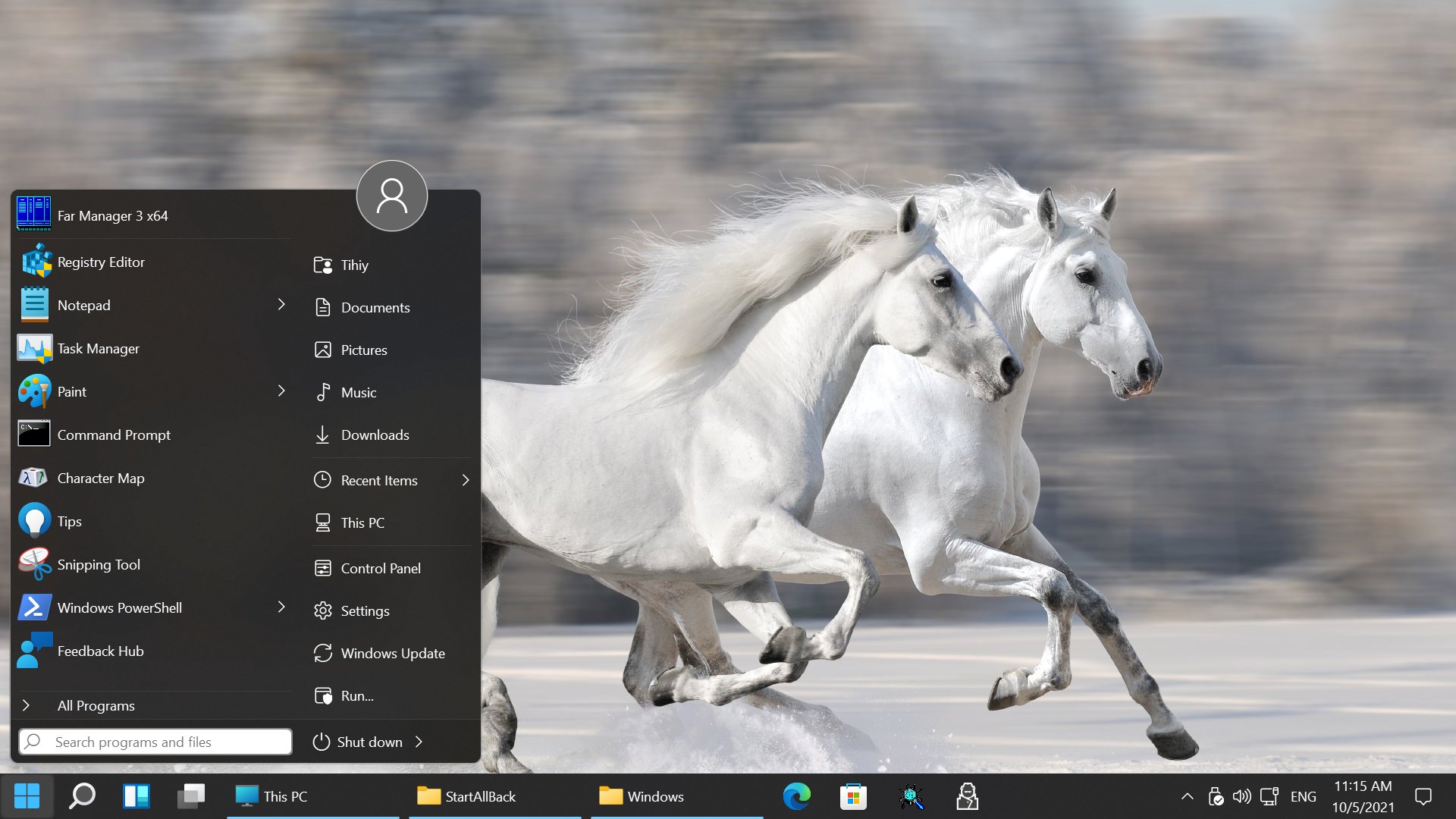
StartAllback | StartIsBack terbaru Oktober 2026, versi 3.9.28 Win 11 | ++ 2.9.20 Win10 | + 1.7.6 Wind 8.1 | 2.1.2 Win 8
Selasa, Oktober 13, 2026


StartIsBack is a tiny application that gives you the possibility of assigning the classical Start button and Start menu to Windows 8. It packs a few configuration settings that can be handled by users of any level of experience.


What’s cool in StartIsBack?
New unique features :
– Everything at once. Hold down Windows key for half a second until search icon appears in the center of the screen; release it and have instant access to all your running apps, taskbar and charms or search bar at the same time from any app you use. Its a great multitasking helper which should be very useful for both tablet and classic PCs. You don’t have to learn all keyboard shortcuts, run your mouse to the screen corners or perform awkward swipes. Just hold down Windows key on keyboard or double-tap Win logo on the tablet! (off by default)
– Taskbar on Start screen. You can set StartIsBack to always display taskbar on Start screen and greatly reduce Start screen stress!
Although this function appeared in SIB 2.1, it really shines in Windows 8.1 when you set your wallpaper for Start screen.

General :
– Start menu has been rebuilt from ground up. It no longer uses code present in explorer; but! No features were lost and actually has been improved with new features and many fixes for bugs present in original menu code. StartIsBack+ uses LESS resources than native menu!
– Start menu utilizes start menu “soul” left in Windows; it’s fully compatible with Windows 7 / StartIsBack settings and policies
– StartIsBack+ does not require a process or service to run, comes with support / translation for all Windows languages (where MUI is available)
– StartIsBack+ is better suited for tablets and convertibles.

Start menu :
– Start menu has been rebuilt from ground up. Lot of Windows 7 menu bugs were fixed
– Items in right pane can be removed or tweaked in-place (hold shift with right-click)
– Items in right pane can be configured as menu for more items (like Connect To)
– You can add your own folders into right pane by drag & drop
– All Programs can show folders before items
– Start menu configuration is much more streamlined
– Start menu can be configured not to cover taskbar when it’s placed on screen side

Start Apps (Modern apps) folder in All Programs :
– Higher-quality icons are used
– You can create a shortcut for Modern app from Start Apps folder directly via drag & drop
– You can uninstall Modern apps directly from context menu

Start button:
– StartIsBack+ provides start button for each taskbar
– StartIsBack+ uses built-in Windows 8.1 start button image (by default), but with different selection / animation effect to distinguish it

Skinning:
– Same skins included; Plain8 is the default
– Start menu is a full sheet of glass; without hacks
– Glass layer can be turned off totally; without hacks
– StartIsBack+ allows using msstyles from Windows 8 unaltered (you still need UxStyle or whatever)
– StartIsBack+ has built-in high contrast skin

Other changes:
– All screen edges but bottom-left are enabled by default
– Settings for bottom-left corner were removed
– F3 on desktop no longer launches desktop search
– StartIsBack+ settings for start menu are now stored in ..\StartIsBack registry key, not in …\Explorer\Advanced. Existing settings are migrated.
– StartIsBack+ is not yet optimized for screen readers
Fully translated: English, Russian, Brazilian Portuguese, European Portuguese, French, Danish, Greek, Italian, Turkish, Spanish, German, Polish, Czech, Croatian, Slovak, Finnish, Korean, Dutch, Norwegian, Serbian, Slovenian, Bangla, Hungarian, Swedish, Simplified Chinese, Indonesian, Arabic, Thai, Traditional Chinese, Farsi, Ukrainian, Lithuanian, Bulgarian, Latvian.

New's in Version 3.9.28 ~ 12 October 2026
• Major improvements and fixes
 
New's in Version ++ 2.9.20~ 15 February 2024
• Fixes for new Windows 10 updates

New's in  Version + 1.7.6 ~ 24 October 2016
• Digital signature updated

New's in  Version 2.1.2 ~ 30 August 2013
• New: Latvian, Bulgarian translation
• Fixed: minor configuration program issues
• Updated group policy file


Download StartAllBack 3.9.28 | Windows 11 |  2,0 MB | 
 
Download StartIsBack ++ 2.9.19 | Windows 10 |  1,45 MB | 
 
Download StartIsBack + 1.7.6 | Windows 8.1 | 1,14 MB | 
 
Download StartIsBack 2.1.2 | Windows 8 | 923 KB |

Stardock Start Menu, terbaru September 2026, versi Start11 versi 2.8.1 | Start10 versi 1.98 | Start8 versi 1.56 |
Sabtu, September 26, 2026


Microsoft Windows® 8 is shipped without the “Start” menu. Stardock heard the cries from Windows 8 users and Start8 brings back the Start menu to Windows 8, 10, & 11. It’s the most used desktop feature billions of users depend on every day and packed it with additional functionality. Start8, Star10, & Star11 includes support for “jump lists”/recent documents for recently accessed programs (Devices, Documents, Music, Videos, Photos, Computer, and more). Pin favorite desktop and Metro apps shortcuts directly to the start menu for easy access. Stardock Start8,Start10, & Start11 adds searchable Windows 8-style (Modern UI) Start menu options for Windows desktop applications, Modern applications, and documents. It allows automatically load directly to your Windows desktop on login (vs the start screen).

Features Star11 :
Familiar
• Replace the Start menu with a classic version. Choose from several styles such as Windows 7, Windows 10, or a modern adaptation of these classic menus that feels fresh and familiar.
Enhance
• Bring back missing features from previous versions of Windows like moving the taskbar to top of your display or the Windows 10-style taskbar context menu.
• Unleash a more powerful and integrated search experience that keeps you centered on your content.
Personalize
• Make your Start menu match your personality with robust customization options that allow you to change styles, colors, transparency, shortcut links, rounded or squared corners, and much more.
• Take control of the taskbar by adjusting its size, color, blur and more to make it match your personalized Start menu.
Control
• Take complete control of your Start button by moving it to the center or the left, move it to the top of the screen, or change how the Start button responds to clicks, keypresses and more.
• Change the icon grid styles to find the right configuration for your workflow – keep it compact for minimalism or space it out for easier touch input.


System Requirements :
Windows 11

Version
• UI: 2.81
• File version: 2.8.1.0

Changes
• Fixes taskbar alignment problem with centered taskbar icons on secondary displays when the taskbar is at the bottom.

Download Stardock Start11 | versi 2.8.1 | 50 MB |


.

Features Star10 :
• Search menu is back in the Start menu
• Restores the quick links to core system functionality
• Maintains the "All Programs" folder metaphor
• Texture can be applied to Start10 background and taskbar

System Requirements :
Windows 10

New's in Stardock Start10 ~ 1.98 :
• Resolves texture background on taskbar not applying under the weather control in newer versions of WIn10
• Resolves a small resource leak
• Misc bugfixes

Download Stardock Start10 | versi 1.98 | 34,24 MB |


Features Star8 :
• Add the Windows 8 menu to the Start menu.
• Windows 7-styled Start menu enhanced for Windows 8
• Pin Modern applications to the Windows 8 Start menu
• Boot directly to the Windows 8 desktop

System Requirements :
Windows 8/8.1 or Windows Server 2012/2012R2

New's in Stardock Start8 ~ 1.56 :
• Minor updates and fixes

Download Stardock Start8  | versi 1.56 | 10,42 MB |


Windows 10 Login Changer terbaru Maret 2016, versi 1.5 ( 0.0.1.5 )
Rabu, Maret 23, 2016

Windows 10 Login Changer is tiny app that help you quickly change your Windows Login image with just one click. At the ‘Image’ tab you can changes your system Login image by using any picture you like. Furthermore if you need more advanced configuration for Login screen, you can open ‘Advanced’ tab. In there; you can change the Login screen to any colour, you can also disable User Account Picture there and there are more function waiting you to discover.

Changelog v1.5 (0.0.1.5 ) :

• Bug Fixes
Credits:
alexwilson (original Pri edit method)
Jens Thie (MetroFramework)

Download Windows 10 Login Changer 1.5 (0.0.1.5) | 715 kb |


League of Legends Theme, Theme LoL untuk PC bagi Gamers LoL sejati
Sabtu, Juni 21, 2014
League of Legends (LoL) adalah game Online 3D dengan kualitas kelas dunia yang dikembangkan oleh Riot Games dari Amerika Serikat. Tidak lama setelah diluncurkan di Amerika pada Oktober 2009, LoL dengan sangat cepat merai popularitas yang luar biasa. Dengan berbagai keunggulan-nya, LoL pun Booming di berbagai negara lain di Eropa dan Asia. Sekarang, LoL telah menjadi game PC yang paling sering dimainkan di dunia termasuk kita di Indonesia.
Bagi gamer sejati LoL tentunya kurang lengkap tanpa tampilan desktop Game ini, beriku ling downloadnya

Untuk Windows 7


Untuk Windows 8


Sebelum menginstal theme instal dahulu : Skin Pack Auto UXTheme Patcher 3.0

Untuk Mengganti Star Menu (StartOrb) : Gunakan Start Menu~Windows 7 Star Menu Changer

Ads 728x90