Blue Link: Download Manager

Free Download ~ Info ~ Etc

Ads 728x90

Tampilkan postingan dengan label Download Manager. Tampilkan semua postingan
Free Download Manager terbaru Juli 2026, versi 6.34.3 Build 6948 | 5.1.38 Build 7312  | 3.9.7 Build 1638
Rabu, Juli 22, 2026

Free Download Manager (FDM) is a powerful, easy-to-use and absolutely free download accelerator and manager. Moreover, FDM is 100% safe, open-source software distributed under GPL license. FDM 5.0 alpha version brings a completely new, simplified and more user-friendly interface design. It also provides some advanced features, such as a drag-and-drop option for all links to download videos from YouTube. FDM accelerates downloads by splitting files into sections and then downloading them simultaneously. As a result download speed increases up to 600%, or even more! FDM can also resume broken downloads so you needn`t start downloading from the beginning after casual interruption. FDM lets you download files and whole web sites from any remote server via HTTP, HTTPS and FTP. You can also download files using BitTorrent protocol.

 Features:
GNU General Public License. Free Download Manager is released under GNU Public License!.
BitTorrent support. Download files using BitTorrent protocol.
Remote Control. Create new downloads or view the list of active and completed downloads remotely, via the internet.
Portable mode. If you want to use Free Download Manager on different computers, you can easily create its portable version and avoid the need to install and configure the program on each computer.
Enhanced audio/video files support. Preview audio/video files before download is completed and convert file format after download.
Absolutely free and 100% safe. Free Download Manager is free, open-source software distributed under GPL license.
Download acceleration. Free Download Manager splits files into several sections and downloads them simultaneously, allowing you to use any type of connection at the maximum available speed. With FDM download speed increases, or even more!
Resuming broken downloads. When the downloading process is interrupted, you needn’t start from the beginning again. Free Download Manager can resume broken download from where it was interrupted saving your time, nerves and money.
Smart file management and powerful scheduler. With FDM you can easily organize downloaded files by their type, placing them in predefined folders. A smart scheduler allows you to start and pause downloading files, as well as perform other actions (launch other applications, establish or hang up connection, etc.) at the set time.
Adjusting traffic usage. There are several traffic usage modes. You can adjust traffic usage for browsing the Internet and downloading files at the same time.
Site Explorer. Site Explorer lets you view the folders structure of a web site and easily download necessary files or folders.
HTML Spider. You can download whole web pages or even whole web sites with HTML Spider. The tool can be adjusted to download files with specified extensions only.
Simultaneous downloading from several mirrors. Free Download Manager is able to download files from several mirrors simultaneously.
Zip files partial download. Free Download Manager lets you download only the necessary part of a zip file.
Active spyware and adware protection through active communication among users. You can read what other community members say about the file you are going to download, right in the program window, and also leave your own opinion about the file you downloaded. In this way FDM users are always warned against useless or malicious files.
Multi language support. Free Download Manager is translated into 30 languages. Supported languages are: Macedonian, Serbian, Albanian, Croatian, Korean, Arabic, Brazilian Portuguese, Bulgarian, Chinese Traditional, Chinese, Czech, German, Dutch, French, Hebrew, Hungarian, Italian, Polish, Portuguese-Brazil, Romanian, Russian, Slovak, Spanish, Swedish, Turkish, Uzbek, Greek, Vietnamese, Slovenian, Persian.

 Operating systems:
• Microsoft Windows XP SP1 and higher

Changes in Free Download Manager 6.34.3 Build 6948 (July 17, 2026):
- macOS: ARM support.
- Fixed: minor bugs.
- macOS: fixed: issues with Homebrew Python.
- Linux: fixed: use X11 by default to fix main window issues under Ubuntu 26.
- Linux: fixed: missing dependencies in DEB file.

Changes in Free Download Manager 5.1.38 Build 7312 (2019-01-31):
- General bug fixes.

Changes in Free Download Manager 3.9.7 build 1638 (2017-10-27) :
Changes:
[+] Firefox 57+ support.

System requirements:
- Windows 7 and higher
- Mac OS X 10.9 and higher

Screenshot:

Homepage – http://www.freedownloadmanager.org

Download Free Download Manager Windows x86 | 6.20.0.5470 | 29 MB |

Download Free Download Manager 6.34.3 Build 6948  :
Download Free Download Manager Windows x64 | 41 MB |

Internet Download Manager (IDM) terbaru Juli 2026, versi 6.43 Build 6
Rabu, Juli 22, 2026


What’s new in version 6.43 Build 6 (Released: Jul 18, 2026)
• Fixed a bug when converting TS video to MP4

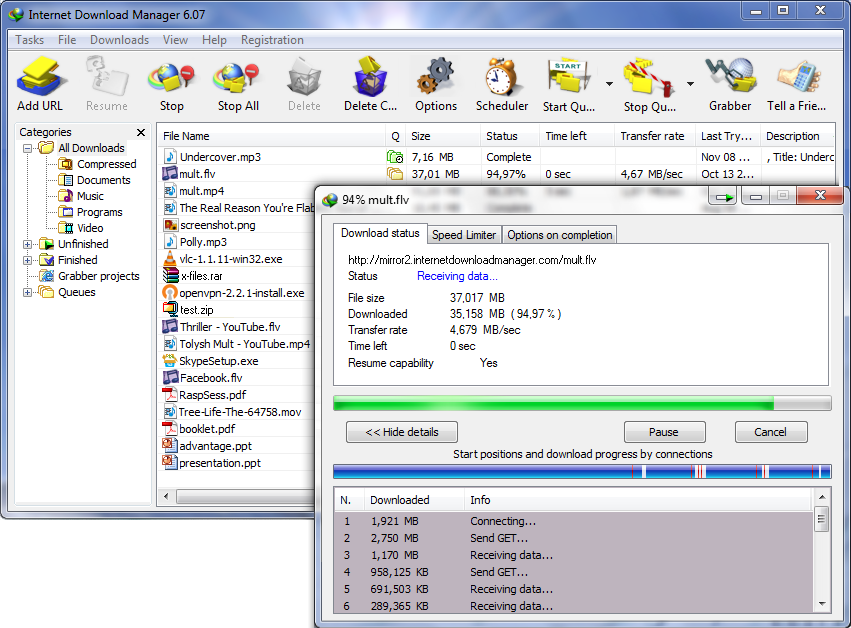
Internet Download Manager (IDM) is a tool to increase download speeds by up to 5 times, resume and schedule downloads. Comprehensive error recovery and resume capability will restart broken or interrupted downloads due to lost connections, network problems, computer shutdowns, or unexpected power outages. Simple graphic user interface makes IDM user friendly and easy to use.Internet Download Manager has a smart download logic accelerator that features intelligent dynamic file segmentation and safe multipart downloading technology to accelerate your downloads. Unlike other download managers and accelerators Internet Download Manager segments downloaded files dynamically during download process and reuses available connections without additional connect and login stages to achieve best acceleration performance.

Internet Download Manager supports proxy servers, ftp and http protocols, firewalls, redirects, cookies, authorization, MP3 audio and MPEG video content processing. IDM integrates seamlessly into Microsoft Internet Explorer, Netscape, MSN Explorer, AOL, Opera, Mozilla, Mozilla Firefox, Mozilla Firebird, Avant Browser, MyIE2, and all other popular browsers to automatically handle your downloads. You can also drag and drop files, or use Internet Download Manager from command line. Internet Download Manager can dial your modem at the set time, download the files you want, then hang up or even shut down your computer when it’s done.

Other features include multilingual support, zip preview, download categories, scheduler pro, sounds on different events, HTTPS support, queue processor, html help and tutorial, enhanced virus protection on download completion, progressive downloading with quotas (useful for connections that use some kind of fair access policy or FAP like Direcway, Direct PC, Hughes, etc.), built-in download accelerator, and many others.

Version 6.25 adds Windows 10 compatibility, adds IDM download panel for web-players that can be used to download flash videos from sites like MySpaceTV, and others. It also features complete Windows 7 and Vista support, video page grabber, redeveloped scheduler, and MMS protocol support. The new version also adds improved integration for IE 11 and IE based browsers, redesigned and enhanced download engine, the unique advanced integration into all latest browsers, improved toolbar, and a wealth of other improvements and new features.

Download IDM terbaru Jul 2026 :


YTD Video Downloader terbaru Juni 2025, versi 7.6.7.0
Selasa, Juni 10, 2025


YTD Video Downloader is software that allows you to download videos from YouTube, Google Video, Yahoo Video, and many others and convert them to other video formats. The program is easy to use, just specify the URL for the video you want to download and click the Ok button! It also allows you to convert downloaded videos for Ipod, Iphone, PSP, Cell Phone, Windows Media, XVid and MP3. You can use YouTube Downloader to download the videos of your choice from home, at the office or in school. Download YouTube Downloader now and get started downloading your favorite videos from YouTube. BienneSoft guarantees that YouTube Downloader is 100% CLEAN, which means it does not contain any form of malware, including but not limited to: spyware, viruses, trojans and backdoors.

YouTube Converter Features
• Get High Definition Video
• Download and Watch Later
• Converter Works with Most Formats
• Watch on Other Devices
• It’s Fast and Easy to Use
• Video Player Integrated

General Points :
• Download videos from YouTube, Google Video, MySpaceTV and many others
• Allows you to access YouTube videos for which you need to be 18+ years of age
• Converts video for Ipod, Iphone, PSP, Cell Phone, Windows Media, XVid and MP3
• Provides the ability to cut and select the output quality of converted videos
• Uses the FFmpeg engine to convert the videos
• Plays videos downloaded in Flash
• Extremely easy to use

System Requirement:
• Intel Pentium 233 Mhz (or equivalent processor, such as AMD) or better
• Windows 2000/XP/Vista/7/8
• Explorer 5.0 or higher
• 64 MB of RAM
• Adobe Flash Player
• Visual Basic 6.0 Run-Time Files


What’s new: YTD Video Downloader 5.9.15 (01/30/2020)
• Resolved user-reported issues related to video downloads.

Download YTD :
YTD 7.6.7.0 | Link 1 | Link 2 | Online | 28 MB |

YTD 7.0 | Offline | Mac | 14 MB |

YTD APK | Android | 3 MB |
µTorrent terbaru November 2024, versi 3.6.0 Build 47168 Classic | 1.3.0  Web
Jumat, November 29, 2024

µTorrent 3 - merupakan klien BitTorrent (sangat) kecil untuk Windows atau Mac dengan banyak fitur. µTorrent merupakan evolusi klasik alami dari "​​tiny-but-mighty". Sementara antarmuka telah dipoles dan ukuran keseluruhan tetap lebih kecil dari rata-rata Anda Facebook pic, uTorrent sekarang dikemas dengan beberapa fitur baru gila-gilaan kuat .. uTorrent adalah # 1 torrent download klien pada desktop di seluruh dunia.

µTorrent 3 Features
Streaming: Watch videos within seconds with progressive downloads – no need to wait. Especially great for previewing a file before committing to the full download.
Remote Access: Start, stop, and monitor torrent downloads on the go. Access your client from any Web browser, or download our Android app.
Ratings and Comments: Leverages the collective wisdom of the community to ensure the quality and security of downloaded torrents.
Feature Hiding: Minimizing parts of the µT interface with a click.
Portable Mode: Run your µTorrent client directly from a USB key and take it with you anywhere.
Stability etc.: µTorrent 3 also offers under-the-hood improvements including a focus on stability as well as improved Web seeding to add speed and reliability to the process of finding the original source of a single-source file.

Changes in µTorrent Classic 3.6.0 Build 46590, 2022-09-19 :
• Released chromium edge embedded webview support
• Includes enhancements to improve torrent swarm health
• Makes more peers and seeds available to more BitTorrent community users

µTorrent Web 1.2.10 Build 5208
– Update backend components and toolchains for Windows and macOS
– Improve correctness of backend network request handlers
– Improve support for Chrome 107 and beyond
– Fix spurious “Add Torrent Failed” notifications on Chrome 105 and beyond
– Fix setting of incorrect network headers for some requests

Homepage – http://utorrent.com

Download µTorrent 3.6.0 Build 47168 Classic  | Link 1 | Link 2 | 1,68 MB |
Ummy Video Downloader terbaru April 2021, versi 1.10.9 Windows | 1.7.2 Mac
Kamis, April 29, 2021

Mendownload video youtube mudah dan gratis dengan Ummy Video Downloader, semudah berjalan kaki, tinggal salin dan paste kan Link ke Ummy Video Downloader, ukuran video pun beragam Hingga 4K tergantung sumber video di youtube yang tersedia

Features you get with Ummy YouTube downloader :
• HD videos with sound YouTube
• Videos from RuTube
• Download MP3 from YouTube
• Compatible with Windows XP/Vista/7/8/10
• MP4 extraction from a video
• Downloading playlists from YouTube

Download :
Ummy Video Downloader : versi 1.10.9 | Windows | Online | 874 Kb |

Ummy Video Downloader : versi 1.72 | Mac | 100 MB |


Microsoft Windows and Office ISO Download Too terbaru Januari 2021, versi 8.46
Sabtu, Januari 09, 2021
https://www.heidoc.net/joomla/technology-science/microsoft/67-microsoft-windows-and-office-iso-download-tool

This new tool allows an easy and comfortable way to download genuine Windows 7, 8.1 and 10, as well as Office 2007, 2010, 2013 and 2016 disk images (ISO) directly from Microsoft's servers.
Ever since Microsoft pulled the Windows disk images from Digital River, hunting for untouched ISO files has been a pain. Our new tool will make your life easier, and provides and interface to Microsoft TechBench to download original Windows images directly from Microsoft's server.
As of version 2.00, the tool can also download Microsoft Office.

Version History :
Version 8.46 (8 January 2020) :
• Added new builds for Office 2019 for Mac;
• added new Insider and developer versions up to build 21286;
• ISO Tools with full SHA256 support for MSDN metadata dump (and MD5 support for old Digital River downloads);
• many small bugfixes under the hood.

Requirements :
• Windows 7 or newer
• .NET Framework 4.x,
• Internet Explorer 8 or newer. 


Download : | Link  ~ EXE | 6,97 MB |


EagleGet terbaru Mei 2020, versi 2.1.6.70
Selasa, Mei 19, 2020

EagleGet is a free universal download accelerator, it supports HTTP, HTTPS, FTP, MMS and RTSP protocol as well as popular online video websites. EagleGet can be integrated to Chrome, IE, Firefox, Opera, and uses multi-threaded technology to boost downloads, the dedicated downloader could increase download by implementing up to 32 threads for each download task, which could speed up your download by up to 6 times. EagleGet has visually appealing interface, and it’s completely free without any virus, malware or spyware. EagleGet has many advantages compared to other similar products. For example, EagleGet has ad-free video sniffer, and EagleGet is the first freeware download manager that supports automatic refresh expired download links.

 Features :
• Accelerate downloads by using multi-threaded technology.
• Download online videos from popular sites.
• Optimized for HD and HTML5 web videos.
• Built-in Video Sniffer.
• Support MMS, HTTP, HTTPS, FTP and RTSP protocols.
• Support HTTP and SOCKET proxy.
• Batch downloads function.
• Support fully customized User-Agent.
• Automatic refresh expired download address.
• Download files in Chrome, IE, Firefox and Opera with one click.
• Download different file types to separate folders.
• Monitor running and completed tasks with TaskMonitor.
• Built-in download scheduler.
• Supports drag-and-drop to rearrange the priority of downloads.
• Automatic run virus scan after download.
• Convenient task properties panel.
• Detailed connection log for each task.
• Verify integrity of downloaded files.
• Shutdown, hibernate or sleep computer after completing all transfers.
• Built-in speed limiter.
• Silent Mode (or Game Mode) function.
• Import download lists from other download managers.
• Supports multi-language interface (up to 20 languages).

EagleGet 2 Highlights:
1. Chrome Crash when open Gmail Offline with EG extension enabled.
2. Logic Optimization for the duplicate downloads
3. Optimized: UI experience for the media grabber
4. Optimized: Other minor improvements and fixes
5. Optimized: New language packs.
6. Fixed: Problem with video sniffer
7. Fixed: Several problems related the sorting of Queue
8. Fixed:Merge & convert Media in the Media Grabber

What’s new in v2.1.5.10 Stable (August 3, 2019)
1. Optimized BT download Engine.
2. Logic Optimization for the duplicate downloads
3. Optimized: UI experience for the media grabber
4. Optimized: Other minor improvements and fixes
5. Upgrade the media grabber

Homepage – http://www.eagleget.com

Download EagleGet 2.1.6.70 Freeware | 10,00 MB |
Download EagleGet 2.1.5.10 Portable | 15,58 MB |
Download EagleGet Plugin for Chrome


µTorrent terbaru Mei 2015, versi 3.4.3 Build 40298
Jumat, Mei 15, 2015
µTorrent 3 - merupakan klien BitTorrent (sangat) kecil untuk Windows atau Mac dengan banyak fitur. µTorrent merupakan evolusi klasik alami dari "​​tiny-but-mighty". Sementara antarmuka telah dipoles dan ukuran keseluruhan tetap lebih kecil dari rata-rata Anda Facebook pic, uTorrent sekarang dikemas dengan beberapa fitur baru gila-gilaan kuat .. uTorrent adalah # 1 torrent download klien pada desktop di seluruh dunia.

µTorrent 3 Features
Streaming: Watch videos within seconds with progressive downloads – no need to wait. Especially great for previewing a file before committing to the full download.
Remote Access: Start, stop, and monitor torrent downloads on the go. Access your client from any Web browser, or download our Android app.
Ratings and Comments: Leverages the collective wisdom of the community to ensure the quality and security of downloaded torrents.
Feature Hiding: Minimizing parts of the µT interface with a click.
Portable Mode: Run your µTorrent client directly from a USB key and take it with you anywhere.
Stability etc.: µTorrent 3 also offers under-the-hood improvements including a focus on stability as well as improved Web seeding to add speed and reliability to the process of finding the original source of a single-source file.

Changes in µTorrent 3.4.3 build 40298, 2015-05-05:
- hot fix for disappearing tabs in previous stable


Homepage – http://utorrent.com

Download µTorrent 3.4.3 Build 40298 Stable

Download µTorrent for Android
EagleGet terbaru April 2015, versi 2.0.3.6 (Free Download Manager)
Rabu, April 01, 2015

EagleGet is a free universal download accelerator, it supports HTTP, HTTPS, FTP, MMS and RTSP protocol as well as popular online video websites. EagleGet can be integrated to Chrome, IE, Firefox, Opera, and uses multi-threaded technology to boost downloads, the dedicated downloader could increase download by implementing up to 32 threads for each download task, which could speed up your download by up to 6 times. EagleGet has visually appealing interface, and it’s completely free without any virus, malware or spyware. EagleGet has many advantages compared to other similar products. For example, EagleGet has ad-free video sniffer, and EagleGet is the first freeware download manager that supports automatic refresh expired download links.

 Features :
• Accelerate downloads by using multi-threaded technology.
• Download online videos from popular sites.
• Optimized for HD and HTML5 web videos.
• Built-in Video Sniffer.
• Support MMS, HTTP, HTTPS, FTP and RTSP protocols.
• Support HTTP and SOCKET proxy.
• Batch downloads function.
• Support fully customized User-Agent.
• Automatic refresh expired download address.
• Download files in Chrome, IE, Firefox and Opera with one click.
• Download different file types to separate folders.
• Monitor running and completed tasks with TaskMonitor.
• Built-in download scheduler.
• Supports drag-and-drop to rearrange the priority of downloads.
• Automatic run virus scan after download.
• Convenient task properties panel.
• Detailed connection log for each task.
• Verify integrity of downloaded files.
• Shutdown, hibernate or sleep computer after completing all transfers.
• Built-in speed limiter.
• Silent Mode (or Game Mode) function.
• Import download lists from other download managers.
• Supports multi-language interface (up to 20 languages).

EagleGet 2 Highlights:
1. Chrome Crash when open Gmail Offline with EG extension enabled.
2. Logic Optimization for the duplicate downloads
3. Optimized: UI experience for the media grabber
4. Optimized: Other minor improvements and fixes
5. Optimized: New language packs.
6. Fixed: Problem with video sniffer
7. Fixed: Several problems related the sorting of Queue
8. Fixed:Merge & convert Media in the Media Grabber

What’s new in v2.0.3.6 Stable (April 01, 2015)
1. The reloaded browser extension now fully support Stable, Beta, Dev channel of Chrome and Chromium.
2. Optimized user interface for some languages
3. Optimized Video Sniffer function for better compatibility
4. Fixed some minor bugs
Homepage – http://www.eagleget.com

Download EagleGet 2.0.3.6 Freeware
Download EagleGet 2.0.3.6 Portable Version


Download Internet Download Manager (IDM) terbaru Agustus 2014, versi 6.21 Build 7
Kamis, Agustus 21, 2014


Perbaikan yang dilakukan pada versi 6.21 ini build 7 : 
  • Added 64-bit support to "IDM Integration module" Chrome extension
  • Fixed bugs
 (IDM) adalah alat untuk meningkatkan kecepatan download sampai 5 kali, melanjutkan dan jadwal download. Comprehensive error recovery dan melanjutkan kemampuan akan restart download rusak atau terputus karena kehilangan koneksi, masalah jaringan, komputer shutdowns, atau listrik padam tak terduga. Antarmuka pengguna grafis sederhana membuat IDM user friendly dan mudah untuk use.Internet Download Manager memiliki logika download accelerator cerdas yang segmentasi file fitur cerdas dinamis dan download teknologi multi aman untuk mempercepat download Anda. Tidak seperti download manager dan lainnya accelerators Internet Download Manager segmen file yang didownload secara dinamis selama proses download dan sambungan tersedia tanpa menghubungkan dan login langkah untuk mencapai kinerja percepatan terbaik.

Internet Download Manager mendukung proxy server, ftp dan protokol http, firewall, pengalihan, kue, otorisasi, MP3 audio dan pengolahan isi video MPEG. IDM diintegrasikan ke dalam Microsoft Internet Explorer, Netscape, MSN Explorer, AOL, Opera, Mozilla, Mozilla Firefox, Mozilla Firebird, Avant Browser, MyIE2, dan semua browser populer lainnya untuk secara otomatis menangani download Anda. Anda juga dapat drag dan drop file, atau menggunakan Internet Download Manager dari baris perintah. Internet Download Manager dapat dial modem Anda pada waktu yang ditetapkan, download file yang Anda inginkan, kemudian menggantung atau bahkan mematikan komputer Anda ketika selesai. Fitur lainnya termasuk dukungan multibahasa, zip preview, download kategori, scheduler pro, suara di berbagai aktivitas , dukungan HTTPS, prosesor antrian, membantu dan tutorial html, perlindungan virus ditingkatkan di download selesai, download progresif dengan kuota (berguna untuk koneksi yang menggunakan beberapa jenis kebijakan akses yang adil atau FAP seperti Direcway, Direct PC, Hughes, dll), built -in download accelerator, dan banyak lainnya.


Versi 6.21 menambahkan Windows 8 kompatibilitas, menambahkan panel download IDM untuk web-pemain yang dapat digunakan untuk men-download flash video dari situs seperti YouTube, MySpaceTV, dan Google Video. Ini juga fitur yang lengkap Windows 8, 7 dan Vista support, YouTube grabber, dipugar scheduler, dan MMS dukungan protokol. Versi baru juga menambahkan integrasi ditingkatkan untuk IE dan browser berbasis 10 IE, didesain ulang dan ditingkatkan mesin download, integrasi maju unik ke dalam semua browser terbaru, toolbar ditingkatkan, dan kekayaan perbaikan dan fitur baru.

Download IDM terbaru Agustus 2014 : versi 6.21 build 7

Download Internet Download Manager (IDM) terbaru Agustus 2014, versi 6.21 Build 3
Selasa, Agustus 12, 2014


Perbaikan yang dilakukan pada versi 6.21 ini build 3 : 
  •  Added a feature to search downloads in IDM list
  • Added high DPI support for Google chrome extension
  • Fixed bugs
 (IDM) adalah alat untuk meningkatkan kecepatan download sampai 5 kali, melanjutkan dan jadwal download. Comprehensive error recovery dan melanjutkan kemampuan akan restart download rusak atau terputus karena kehilangan koneksi, masalah jaringan, komputer shutdowns, atau listrik padam tak terduga. Antarmuka pengguna grafis sederhana membuat IDM user friendly dan mudah untuk use.Internet Download Manager memiliki logika download accelerator cerdas yang segmentasi file fitur cerdas dinamis dan download teknologi multi aman untuk mempercepat download Anda. Tidak seperti download manager dan lainnya accelerators Internet Download Manager segmen file yang didownload secara dinamis selama proses download dan sambungan tersedia tanpa menghubungkan dan login langkah untuk mencapai kinerja percepatan terbaik.

Internet Download Manager mendukung proxy server, ftp dan protokol http, firewall, pengalihan, kue, otorisasi, MP3 audio dan pengolahan isi video MPEG. IDM diintegrasikan ke dalam Microsoft Internet Explorer, Netscape, MSN Explorer, AOL, Opera, Mozilla, Mozilla Firefox, Mozilla Firebird, Avant Browser, MyIE2, dan semua browser populer lainnya untuk secara otomatis menangani download Anda. Anda juga dapat drag dan drop file, atau menggunakan Internet Download Manager dari baris perintah. Internet Download Manager dapat dial modem Anda pada waktu yang ditetapkan, download file yang Anda inginkan, kemudian menggantung atau bahkan mematikan komputer Anda ketika selesai. Fitur lainnya termasuk dukungan multibahasa, zip preview, download kategori, scheduler pro, suara di berbagai aktivitas , dukungan HTTPS, prosesor antrian, membantu dan tutorial html, perlindungan virus ditingkatkan di download selesai, download progresif dengan kuota (berguna untuk koneksi yang menggunakan beberapa jenis kebijakan akses yang adil atau FAP seperti Direcway, Direct PC, Hughes, dll), built -in download accelerator, dan banyak lainnya.


Versi 6.21 menambahkan Windows 8 kompatibilitas, menambahkan panel download IDM untuk web-pemain yang dapat digunakan untuk men-download flash video dari situs seperti YouTube, MySpaceTV, dan Google Video. Ini juga fitur yang lengkap Windows 8, 7 dan Vista support, YouTube grabber, dipugar scheduler, dan MMS dukungan protokol. Versi baru juga menambahkan integrasi ditingkatkan untuk IE dan browser berbasis 10 IE, didesain ulang dan ditingkatkan mesin download, integrasi maju unik ke dalam semua browser terbaru, toolbar ditingkatkan, dan kekayaan perbaikan dan fitur baru.

Download IDM terbaru Agustus 2014 : versi 6.21 build 3

µTorren terbaru Juli 2014 versi 3.4.2 Build 32549
Jumat, Juli 25, 2014

Free Torrent download manager terbaru & terbaik ÂµTorrent 3.4.2 build 32549 link download :


uTorrent is a lightweight and powerful very tiny Bittorent client by over 100 million of users and many advanced features: Micro-Sized Yet Feature Filled, Resource-Friendly, Skinnable and Localized. µTorrent is a natural evolution of the classic “tiny-but-mighty” vision. While the interface has been polished and the overall size remains smaller than your average Facebook pic, µTorrent is now packed with some insanely powerful new features.

Features that make µTorrent so popular:

Tiny
µTorrent is less than 800 KB (smaller than a digital photo!). It installs ultra-fast with a light footprint on your computer, and runs super-efficiently.

Easy
Simple and straightforward – that's µTorrent. With its purpose-built interface, downloading torrents is a snap.

Accessible
Access µTorrent from anywhere with µTorrent Remote. Easily access your home clients securely (using ultra-private authentication and key-exchange).

Innovative
Since µTorrent is offered by the team who invented the BitTorrent open source protocol, you know you will always have access to the latest and greatest technologies.

Fast
Expertly designed for fast downloads. Avoids hogging valuable system resources, runs quietly in the background, and doesn't interfere with your work, play etc.

Cutting Edge
Incorporating groundbreaking µTP technology, µTorrent maximizes bandwidth and reduces congestion - so you have the smoothest, quickest downloads possible and don't make your internet connection slow to a crawl.

Intelligent
µTorrent is instinctively smart. It auto-adjusts bandwidth usage based upon your network and the Internet. Use Skype, play games, stream video etc., all without interference.

Plug-n-Play


µTorrent is a snap to install on your home network. In most cases, it's plug-n-play. It also uses UPnP and NAT-PMP technologies to prepare your router for torrent access.
Download Internet Download Manager (IDM) terbaru Juli 2014, versi 6.21 Build 2
Jumat, Juli 25, 2014


Perbaikan yang dilakukan pada versi 6.21 ini build 2 : 
  • Added support for Firefox 33 and SeaMonkey 2.29
 (IDM) adalah alat untuk meningkatkan kecepatan download sampai 5 kali, melanjutkan dan jadwal download. Comprehensive error recovery dan melanjutkan kemampuan akan restart download rusak atau terputus karena kehilangan koneksi, masalah jaringan, komputer shutdowns, atau listrik padam tak terduga. Antarmuka pengguna grafis sederhana membuat IDM user friendly dan mudah untuk use.Internet Download Manager memiliki logika download accelerator cerdas yang segmentasi file fitur cerdas dinamis dan download teknologi multi aman untuk mempercepat download Anda. Tidak seperti download manager dan lainnya accelerators Internet Download Manager segmen file yang didownload secara dinamis selama proses download dan sambungan tersedia tanpa menghubungkan dan login langkah untuk mencapai kinerja percepatan terbaik.

Internet Download Manager mendukung proxy server, ftp dan protokol http, firewall, pengalihan, kue, otorisasi, MP3 audio dan pengolahan isi video MPEG. IDM diintegrasikan ke dalam Microsoft Internet Explorer, Netscape, MSN Explorer, AOL, Opera, Mozilla, Mozilla Firefox, Mozilla Firebird, Avant Browser, MyIE2, dan semua browser populer lainnya untuk secara otomatis menangani download Anda. Anda juga dapat drag dan drop file, atau menggunakan Internet Download Manager dari baris perintah. Internet Download Manager dapat dial modem Anda pada waktu yang ditetapkan, download file yang Anda inginkan, kemudian menggantung atau bahkan mematikan komputer Anda ketika selesai. Fitur lainnya termasuk dukungan multibahasa, zip preview, download kategori, scheduler pro, suara di berbagai aktivitas , dukungan HTTPS, prosesor antrian, membantu dan tutorial html, perlindungan virus ditingkatkan di download selesai, download progresif dengan kuota (berguna untuk koneksi yang menggunakan beberapa jenis kebijakan akses yang adil atau FAP seperti Direcway, Direct PC, Hughes, dll), built -in download accelerator, dan banyak lainnya.


Versi 6.21 menambahkan Windows 8 kompatibilitas, menambahkan panel download IDM untuk web-pemain yang dapat digunakan untuk men-download flash video dari situs seperti YouTube, MySpaceTV, dan Google Video. Ini juga fitur yang lengkap Windows 8, 7 dan Vista support, YouTube grabber, dipugar scheduler, dan MMS dukungan protokol. Versi baru juga menambahkan integrasi ditingkatkan untuk IE dan browser berbasis 10 IE, didesain ulang dan ditingkatkan mesin download, integrasi maju unik ke dalam semua browser terbaru, toolbar ditingkatkan, dan kekayaan perbaikan dan fitur baru.

Download IDM terbaru Juli 2014 : versi 6.21 build 2

µTorren terbaru Juli 2014 versi 3.4.2 build 32354
Jumat, Juli 18, 2014

Free Torrent download manager terbaru & terbaik ÂµTorrent 3.4.2 build 32354 link download :


uTorrent is a lightweight and powerful very tiny Bittorent client by over 100 million of users and many advanced features: Micro-Sized Yet Feature Filled, Resource-Friendly, Skinnable and Localized. µTorrent is a natural evolution of the classic “tiny-but-mighty” vision. While the interface has been polished and the overall size remains smaller than your average Facebook pic, µTorrent is now packed with some insanely powerful new features.

Features that make µTorrent so popular:

Tiny
µTorrent is less than 800 KB (smaller than a digital photo!). It installs ultra-fast with a light footprint on your computer, and runs super-efficiently.

Easy
Simple and straightforward – that's µTorrent. With its purpose-built interface, downloading torrents is a snap.

Accessible
Access µTorrent from anywhere with µTorrent Remote. Easily access your home clients securely (using ultra-private authentication and key-exchange).

Innovative
Since µTorrent is offered by the team who invented the BitTorrent open source protocol, you know you will always have access to the latest and greatest technologies.

Fast
Expertly designed for fast downloads. Avoids hogging valuable system resources, runs quietly in the background, and doesn't interfere with your work, play etc.

Cutting Edge
Incorporating groundbreaking µTP technology, µTorrent maximizes bandwidth and reduces congestion - so you have the smoothest, quickest downloads possible and don't make your internet connection slow to a crawl.

Intelligent
µTorrent is instinctively smart. It auto-adjusts bandwidth usage based upon your network and the Internet. Use Skype, play games, stream video etc., all without interference.

Plug-n-Play


µTorrent is a snap to install on your home network. In most cases, it's plug-n-play. It also uses UPnP and NAT-PMP technologies to prepare your router for torrent access.
Download Internet Download Manager (IDM) terbaru Juli 2014, versi 6.21
Sabtu, Juli 12, 2014

Internet Download Manager (IDM) is a tool to increase download speeds by up to 5 times, resume and schedule downloads. Comprehensive error recovery and resume capability will restart broken or interrupted downloads due to lost connections, network problems, computer shutdowns, or unexpected power outages. Simple graphic user interface makes IDM user friendly and easy to use.Internet Download Manager has a smart download logic accelerator that features intelligent dynamic file segmentation and safe multipart downloading technology to accelerate your downloads. Unlike other download managers and accelerators Internet Download Manager segments downloaded files dynamically during download process and reuses available connections without additional connect and login stages to achieve best acceleration performance.

Internet Download Manager supports proxy servers, ftp and http protocols, firewalls, redirects, cookies, authorization, MP3 audio and MPEG video content processing. IDM integrates seamlessly into Microsoft Internet Explorer, Netscape, MSN Explorer, AOL, Opera, Mozilla, Mozilla Firefox, Mozilla Firebird, Avant Browser, MyIE2, and all other popular browsers to automatically handle your downloads. You can also drag and drop files, or use Internet Download Manager from command line. Internet Download Manager can dial your modem at the set time, download the files you want, then hang up or even shut down your computer when it’s done.

Other features include multilingual support, zip preview, download categories, scheduler pro, sounds on different events, HTTPS support, queue processor, html help and tutorial, enhanced virus protection on download completion, progressive downloading with quotas (useful for connections that use some kind of fair access policy or FAP like Direcway, Direct PC, Hughes, etc.), built-in download accelerator, and many others.
Version 6.20 adds Windows 8.1 compatibility, adds IDM download panel for web-players that can be used to download flash videos from sites like MySpaceTV, and others. It also features complete Windows 7 and Vista support, video page grabber, redeveloped scheduler, and MMS protocol support. The new version also adds improved integration for IE 11 and IE based browsers, redesigned and enhanced download engine, the unique advanced integration into all latest browsers, improved toolbar, and a wealth of other improvements and new features.

Internet Download Manager Feature:
 All popular browsers and applications are supported!
Internet Download Manager supports all popular browsers including IE, AOL, MSN, Mozilla, Netscape, Firefox, Avant Browser, and many others. Internet Download Manager supports all vertwork problems, computer shutdowns, or unexpected power outages.

 YouTube grabber.
FLV videos from popular sites like YouTube, MySpaceTV, and Google Video. The best way of downloading webpage embedded videos from the Internet is here. After installing IDM, “Download This Video” button pops up whenever you are watching a video anywhere in the Internet. Just click on the button to start downloading clips.

 Simple installation wizard.Internet Download Manager can record and download
Quick and easy installation program will make necessary settings for you, and check your connection at the end to ensure trouble free installation of Internet Download Manager

 Automatic Antivirus checking.
Antivirus checking makes your downloads free from viruses and trojans. IDM can automatically run a scanner on download completion, like AdAware, Avast, Spybot, AVG Anti-Virus, McAfee, SpywareBlaster, CCleaner and others to protect users from harmful downloaded files.

 Built-in Scheduler.
Internet Download Manager can connect to the Internet at a set time, download the files you want, disconnect, or shut down your computer when it’s done. You can also synchronize changes using periodic synchronization of files. It’s possible to create and schedule several download queues for downloading or synchronization.

 Drag and Drop.
You may simply drag and drop links to IDM, and drag and drop downloaded files out of Internet Download Manager.

 Advanced Browser Integration.
When enabled, the feature can be used to catch any download from any application. None of download managers have this feature.

 IDM includes web site spide Download All feature.
IDM can add all downloads linked to the current page. It’s easy to download multiple files with this feature.

 Download limits.
Progressive downloading with quotas feature limits downloading to defined number of megabytes per hour. The feature is useful for connections that use fair access policy (or FAP) like Direcway, Direct PC, Hughes, etc.

 IDM is multilingual.
IDM is translated to Albanian, Arabic, Azerbaijan, Bosnian, Bulgarian, Chinese, Croatian, Czech, Danish, Dutch, Farsi, French, German, Greek, Hebrew, Hungarian, Italian, Japanese, Korean, Lithuanian, Macedonian, Norwegian, Polish, Portuguese, Romanian, Russian, Serbian, Slovak, Slovenian, Spanish, Thai, Turkish, and Uzbek languages.

 Quick Update Feature.
Quick update may check for new versions of IDM and update IDM once per week. Quick updates feature lists all new features added to the latest version and asks a user if he wants to update IDM to the latest version.

 Download Categories.
Internet Download Manager can be used to organize downloads automatically using defined download categories.

 Dynamic Segmentation.
Dynamic Segmentation and Performance

What’s new in version 6.21
(Released: Jul 11 2014)
• Fixed detections of two separate video and audio streams in Chrome browser
• Improved IDM download engine
• Fixed bugs

ToolsBar IDM : Metro 8
League IDM : Indonesia

Download IDM terbaru Juni 2014 : versi 6.20 build 5

Download Internet Download Manager (IDM) terbaru Juni 2014, versi 6.20 Build 5
Kamis, Juni 19, 2014


Perbaikan yang dilakukan pada versi 6.20 ini build 5 : 
  • Fixed an erroneous interception of attendant content in Google Docs
  • Fixed a critical bug when saving and resuming several types of videos
  • Fixed a bug in the recognition of several types of videos in Google Chrome

 (IDM) adalah alat untuk meningkatkan kecepatan download sampai 5 kali, melanjutkan dan jadwal download. Comprehensive error recovery dan melanjutkan kemampuan akan restart download rusak atau terputus karena kehilangan koneksi, masalah jaringan, komputer shutdowns, atau listrik padam tak terduga. Antarmuka pengguna grafis sederhana membuat IDM user friendly dan mudah untuk use.Internet Download Manager memiliki logika download accelerator cerdas yang segmentasi file fitur cerdas dinamis dan download teknologi multi aman untuk mempercepat download Anda. Tidak seperti download manager dan lainnya accelerators Internet Download Manager segmen file yang didownload secara dinamis selama proses download dan sambungan tersedia tanpa menghubungkan dan login langkah untuk mencapai kinerja percepatan terbaik.

Internet Download Manager mendukung proxy server, ftp dan protokol http, firewall, pengalihan, kue, otorisasi, MP3 audio dan pengolahan isi video MPEG. IDM diintegrasikan ke dalam Microsoft Internet Explorer, Netscape, MSN Explorer, AOL, Opera, Mozilla, Mozilla Firefox, Mozilla Firebird, Avant Browser, MyIE2, dan semua browser populer lainnya untuk secara otomatis menangani download Anda. Anda juga dapat drag dan drop file, atau menggunakan Internet Download Manager dari baris perintah. Internet Download Manager dapat dial modem Anda pada waktu yang ditetapkan, download file yang Anda inginkan, kemudian menggantung atau bahkan mematikan komputer Anda ketika selesai. Fitur lainnya termasuk dukungan multibahasa, zip preview, download kategori, scheduler pro, suara di berbagai aktivitas , dukungan HTTPS, prosesor antrian, membantu dan tutorial html, perlindungan virus ditingkatkan di download selesai, download progresif dengan kuota (berguna untuk koneksi yang menggunakan beberapa jenis kebijakan akses yang adil atau FAP seperti Direcway, Direct PC, Hughes, dll), built -in download accelerator, dan banyak lainnya.


Versi 6.20 menambahkan Windows 8 kompatibilitas, menambahkan panel download IDM untuk web-pemain yang dapat digunakan untuk men-download flash video dari situs seperti YouTube, MySpaceTV, dan Google Video. Ini juga fitur yang lengkap Windows 8, 7 dan Vista support, YouTube grabber, dipugar scheduler, dan MMS dukungan protokol. Versi baru juga menambahkan integrasi ditingkatkan untuk IE dan browser berbasis 10 IE, didesain ulang dan ditingkatkan mesin download, integrasi maju unik ke dalam semua browser terbaru, toolbar ditingkatkan, dan kekayaan perbaikan dan fitur baru.

Download IDM terbaru Juni 2014 : versi 6.20 build 5

Download Internet Download Manager (IDM) terbaru Juni 2014, versi 6.20 Build 3
Rabu, Juni 11, 2014


Perbaikan yang dilakukan pada versi 6.20 ini build 3 : 
  • Fixed a critical bug when saving and resuming several types of videos
  • Fixed a bug in the recognition of several types of videos in Google Chrome

 (IDM) adalah alat untuk meningkatkan kecepatan download sampai 5 kali, melanjutkan dan jadwal download. Comprehensive error recovery dan melanjutkan kemampuan akan restart download rusak atau terputus karena kehilangan koneksi, masalah jaringan, komputer shutdowns, atau listrik padam tak terduga. Antarmuka pengguna grafis sederhana membuat IDM user friendly dan mudah untuk use.Internet Download Manager memiliki logika download accelerator cerdas yang segmentasi file fitur cerdas dinamis dan download teknologi multi aman untuk mempercepat download Anda. Tidak seperti download manager dan lainnya accelerators Internet Download Manager segmen file yang didownload secara dinamis selama proses download dan sambungan tersedia tanpa menghubungkan dan login langkah untuk mencapai kinerja percepatan terbaik.

Internet Download Manager mendukung proxy server, ftp dan protokol http, firewall, pengalihan, kue, otorisasi, MP3 audio dan pengolahan isi video MPEG. IDM diintegrasikan ke dalam Microsoft Internet Explorer, Netscape, MSN Explorer, AOL, Opera, Mozilla, Mozilla Firefox, Mozilla Firebird, Avant Browser, MyIE2, dan semua browser populer lainnya untuk secara otomatis menangani download Anda. Anda juga dapat drag dan drop file, atau menggunakan Internet Download Manager dari baris perintah. Internet Download Manager dapat dial modem Anda pada waktu yang ditetapkan, download file yang Anda inginkan, kemudian menggantung atau bahkan mematikan komputer Anda ketika selesai. Fitur lainnya termasuk dukungan multibahasa, zip preview, download kategori, scheduler pro, suara di berbagai aktivitas , dukungan HTTPS, prosesor antrian, membantu dan tutorial html, perlindungan virus ditingkatkan di download selesai, download progresif dengan kuota (berguna untuk koneksi yang menggunakan beberapa jenis kebijakan akses yang adil atau FAP seperti Direcway, Direct PC, Hughes, dll), built -in download accelerator, dan banyak lainnya.


Versi 6.20 menambahkan Windows 8 kompatibilitas, menambahkan panel download IDM untuk web-pemain yang dapat digunakan untuk men-download flash video dari situs seperti YouTube, MySpaceTV, dan Google Video. Ini juga fitur yang lengkap Windows 8, 7 dan Vista support, YouTube grabber, dipugar scheduler, dan MMS dukungan protokol. Versi baru juga menambahkan integrasi ditingkatkan untuk IE dan browser berbasis 10 IE, didesain ulang dan ditingkatkan mesin download, integrasi maju unik ke dalam semua browser terbaru, toolbar ditingkatkan, dan kekayaan perbaikan dan fitur baru.

Download IDM terbaru Juni 2014 : versi 6.20 build 3

µTorren terbaru Juni 2014 versi 3.4.2 build 31515
Jumat, Juni 06, 2014

Free Torrent download manager terbaru & terbaik ÂµTorrent 3.4.2 build 31515 link download :


uTorrent is a lightweight and powerful very tiny Bittorent client by over 100 million of users and many advanced features: Micro-Sized Yet Feature Filled, Resource-Friendly, Skinnable and Localized. µTorrent is a natural evolution of the classic “tiny-but-mighty” vision. While the interface has been polished and the overall size remains smaller than your average Facebook pic, µTorrent is now packed with some insanely powerful new features.

Features that make µTorrent so popular:

Tiny
µTorrent is less than 800 KB (smaller than a digital photo!). It installs ultra-fast with a light footprint on your computer, and runs super-efficiently.

Easy
Simple and straightforward – that's µTorrent. With its purpose-built interface, downloading torrents is a snap.

Accessible
Access µTorrent from anywhere with µTorrent Remote. Easily access your home clients securely (using ultra-private authentication and key-exchange).

Innovative
Since µTorrent is offered by the team who invented the BitTorrent open source protocol, you know you will always have access to the latest and greatest technologies.

Fast
Expertly designed for fast downloads. Avoids hogging valuable system resources, runs quietly in the background, and doesn't interfere with your work, play etc.

Cutting Edge
Incorporating groundbreaking µTP technology, µTorrent maximizes bandwidth and reduces congestion - so you have the smoothest, quickest downloads possible and don't make your internet connection slow to a crawl.

Intelligent
µTorrent is instinctively smart. It auto-adjusts bandwidth usage based upon your network and the Internet. Use Skype, play games, stream video etc., all without interference.

Plug-n-Play


µTorrent is a snap to install on your home network. In most cases, it's plug-n-play. It also uses UPnP and NAT-PMP technologies to prepare your router for torrent access.
Download Internet Download Manager (IDM) terbaru Mei 2014, versi 6.19 build 9
Jumat, Mei 16, 2014


Perbaikan yang dilakukan pada versi 6.19 ini build 9 : 
  • Improved downloading from file sharing sites
  • Fixed bugs

 (IDM) adalah alat untuk meningkatkan kecepatan download sampai 5 kali, melanjutkan dan jadwal download. Comprehensive error recovery dan melanjutkan kemampuan akan restart download rusak atau terputus karena kehilangan koneksi, masalah jaringan, komputer shutdowns, atau listrik padam tak terduga. Antarmuka pengguna grafis sederhana membuat IDM user friendly dan mudah untuk use.Internet Download Manager memiliki logika download accelerator cerdas yang segmentasi file fitur cerdas dinamis dan download teknologi multi aman untuk mempercepat download Anda. Tidak seperti download manager dan lainnya accelerators Internet Download Manager segmen file yang didownload secara dinamis selama proses download dan sambungan tersedia tanpa menghubungkan dan login langkah untuk mencapai kinerja percepatan terbaik.

Internet Download Manager mendukung proxy server, ftp dan protokol http, firewall, pengalihan, kue, otorisasi, MP3 audio dan pengolahan isi video MPEG. IDM diintegrasikan ke dalam Microsoft Internet Explorer, Netscape, MSN Explorer, AOL, Opera, Mozilla, Mozilla Firefox, Mozilla Firebird, Avant Browser, MyIE2, dan semua browser populer lainnya untuk secara otomatis menangani download Anda. Anda juga dapat drag dan drop file, atau menggunakan Internet Download Manager dari baris perintah. Internet Download Manager dapat dial modem Anda pada waktu yang ditetapkan, download file yang Anda inginkan, kemudian menggantung atau bahkan mematikan komputer Anda ketika selesai. Fitur lainnya termasuk dukungan multibahasa, zip preview, download kategori, scheduler pro, suara di berbagai aktivitas , dukungan HTTPS, prosesor antrian, membantu dan tutorial html, perlindungan virus ditingkatkan di download selesai, download progresif dengan kuota (berguna untuk koneksi yang menggunakan beberapa jenis kebijakan akses yang adil atau FAP seperti Direcway, Direct PC, Hughes, dll), built -in download accelerator, dan banyak lainnya.


Versi 6.19 menambahkan Windows 8 kompatibilitas, menambahkan panel download IDM untuk web-pemain yang dapat digunakan untuk men-download flash video dari situs seperti YouTube, MySpaceTV, dan Google Video. Ini juga fitur yang lengkap Windows 8, 7 dan Vista support, YouTube grabber, dipugar scheduler, dan MMS dukungan protokol. Versi baru juga menambahkan integrasi ditingkatkan untuk IE dan browser berbasis 10 IE, didesain ulang dan ditingkatkan mesin download, integrasi maju unik ke dalam semua browser terbaru, toolbar ditingkatkan, dan kekayaan perbaikan dan fitur baru.

Download IDM terbaru Mei 2014 : versi 6.19 build 9


Ads 728x90