Blue Link: HP

Free Download ~ Info ~ Etc

Ads 728x90

Tampilkan postingan dengan label HP. Tampilkan semua postingan
DriverPack Solution terbaru Mei 2026, versi 17.10.14-25060
Jumat, Mei 01, 2026
DriverPack Solution 17 – a DVD version of the most powerful manager for automated driver installation. Scans your computer hardware and offer to install/update the driver for all devices in Offline mode. DriverPack Solution simplifies the process of reinstalling Windows on any computer. No more problems with searching and installing drivers. Everything will be done in a couple of mouse clicks!

SamLab(he’s a person) makes driverpacks for his SamDrivers and the same driverpacks are also used by DriverPack Solution. SamDrivers includes 3 applications for driver installation as opposed to only one in DriverPack Solution. It should be noted that SamDrivers’s edition of DriverPack Solution is modified: expert mode is enabled by default, disabled downloading and executing of a JS script from the Internet, removed some bloatware, etc. Since some bloatware isn’t available in English, so you’re better off using SamDrivers anyway.

Features:
Advantages DriverPack Solution:
• Automated driver installation: The program installs all required drivers to any computer in just about 5 minutes.
• Saves Time and money: No more wasting time on looking for drivers; all required drivers will be installed with only a few clicks.
• Any driver for any computer
* All drivers on a single DVD!
* Simplifies downloading new drivers from the Internet.
• Drivers update capability: Updates previously installed drivers to their latest versions.
• Windows 8 / 7 / Vista / XP
* Supports all modern operating systems!
* Both 64-bit and 32-bit versions!
• Easy to use: Simple and foolproof interface.
• Customization ability: Our program is open source software.
• Distributed for FREE: Under the GNU GPL license.

Program is used:
• home computer users
• System Administrators
• Computer Wizard
• Service for computer repair
• other people who are often faced with installing / reinstalling Windows

Pros of using:
• interface is friendly and intuitive
• intelligent technology classification drivers
• Multiple installation options (for the professional to the novice user)
• multilingualism (does not require linguistic knowledge and effort): English, Russian, Ukrainian, German, French, Italian, Spanish, Turkish, Azeri, Dutch, Lithuanian etc…
• Check the availability of new versions of software

The program is suitable for all models of computers. That includes drivers for laptops:
Acer, ASUS, HP, Dell, MSI, Samsung, Toshiba, Sony, Lenovo, Fujitsu, Fujitsu Siemens, eMachines, Packard Bell, Clevo, BenQ, Notebook, IBM, Apple, Intel, LG, Compaq, Depo, NEC, Gericom, Matsushita, Medion, K-Systems, Gigabyte, SiS, Gateway.

 It will help download free drivers for:
Motherboard, sound card (audio), Video Card, Network Card, Wi-Fi, chipset, controller, Bluetooth (bluetooth), Modem, Web-camera, card reader, CPU, input devices, monitor, printer, scanner, USB, Other …


Download DriverPack Online  : Download <<< | 17.11 .108 | 8,55 MB |
It is downloaded instantly, downloads and installs all drivers if you have Internet connection
 
DriverPack Offline Network  : Download <<< | 17.10.14-25091 | 888 MB | exe-driverpack | Torrent | Turbobit.net | Uploadrar.com | up-load.io |
It contains drivers for network hardware (Lan/Wi-Fi), it operates without connection to Internet

 Download DriverPack Full Link (Torrent) : Download <<< | 17.10.14-25060 | 47 GB | Torrent | Turbobit.net | Gigabase.com |
It contains all drivers, operates without connection to Internet, it can be downloaded through the Torrent-tracker

[Link] Bagi yang ingin menginstal App bawaan ASUS manual
Kamis, Juni 01, 2023

Bagi yang ingin menginstal App bawaan ASUS manual, silahkan download disini :
Nama App | Versi | Ukuran | Android :
App Lock |
  | 1.0.0.140805 | 1,61 MB | 4.0 ~ 4.4 |

• Armoury Crate |
  | 1.0.98 |  6,85 MB | 8.0 ~ 8.1 |
  | 3.5.0.69_201202 | 39,1 MB | 9.0 |
  | 5.10.0.62_210317 | 105,04 MB | 10.0 |
  | 5.60.0.38_220412 | 118,04 MB | 10.0 |

ASUS AudioWizard |
  | 2.0.0.45_160921 |  4,41 MB | 4.4 ~ 6.0 |
  | 6.0.0.42S43_171016 | 4,08 MB | 4.4 ~ 7.0 |
  | 8.0.0.27_190508 | 7,88 MB | 8.0 |
  | 9.0.0.32_190617 | 8,2 MB | 9.0 |
  | 10.1.0.8_200429 | 8,32 MB | 10 |

ASUS Backup |
  | 1.1.0.62_160603 | 5,16 MB | 4.3 ~ 6.0 |

ASUS Browser |
  | 2.1.2.85_170911 | 16,24 MB | 4.4 ~ 6.0 |

ASUS Calculator - unit converter |
  | 1.5.0.95_161014 beta | 4,47 MB | 4.1 ~6.0 |
  | 1.7.0.33_170217 | 6,08 MB | 4.4 ~ 7.0 |
  | 5.0.0.2_180312 | 4,7 MB | 5.0 ~ 7.1 |
  | 5.0.0.24_181004 | 4,72 MB | 7.0 ~ 8.0 |
  | 6.0.0.15_190613 | 5,77 MB | 7.0 ~ 8.0 |
  | 7.4.0.7_210325 | 4,89 MB | 8.1 ~ 9.0 |
  | 8.0.0.16_210325  | 4,61 MB | 8.1 ~ 10 | 
  | 8.1.0.6_211102 | 5,12 MB | 8.1 ~ 10 | 
  | 9.0.0.12_220613 | 5,01 MB | 8.1 ~ 12 | 
  | 10.0.0.16_230508 | 6,42 MB | 12 ~ 13 | 

ASUS Calendar |
  | 2.1.0.57_160729 beta | 8,2 MB | 4.3 ~ 6.0 |

ASUS Calling Screen |
  | 1.7.0.13_160224 | 12,56 MB | 5.0 |
  | 25.0.0.13_170524 | 7,67 MB | 6.0 ~ 7.1 |
  | 25.1.0.33_180226 | 7,17 MB | 7.0 ~ 8.0 |
  | 26.0.0.50_180709 | 4,49 MB | 8.0 ~ 8.1 |
  | 29.0.0.15_200708 | 8,81 MB | 9.0 |
  | 30.0.0.27_211118  | 7,3 MB | 10 ~ 11 |
  | 31.1.0.10_220322 | 8,28 MB | 10 ~ 11 |

ASUS Contacts Widget |
  | 1.1.0.140619 | 0,61 MB | 4.0 |

• ASUS Cover 3.0 for ZenFone 3  |
  | 1.0.0.111_180726 | 23,09 MB | 6.0 ~ 7.0 |

ASUS Cover for Zenfone 2  |
  | 2.0.0.34_160815 | 9,88 MB | 5.0 ~ 6.0 |

• ASUS Data Transfer |
  | 2.048.097 | 11,08 MB | 4.4 ~ 8.0 |
  | 3.122.260.66 | 32,53 MB | 4.4 ~ 9.0 |
  | 4.211.634.130 | 16,36 MB | 6.0 ~ 13 |

ASUS Device Discovery  |
  | 1.0.0.1.10 | 3,55 MB | 3.0 ~ 5.0 | 

ASUS Digital Clock & Widget |
  | 2.1.0.39_170411 | 13,32 MB | 4.2 ~ 7.0 |
  | 3.0.0.35_180117 | 11,01 MB | 5.0 ~ 7.1 |
  | 5.0.0.35_181109 | 11,62 MB | 7.0 ~ 7.1 |
  | 6.0.0.59_200210 | 13,75 MB | 7.0 ~ 8.0 |
  | 7.2.0.14_200924 | 11,72 MB | 7.0 ~ 9.0 |
  | 8.0.0.31_210224 | 13,43 MB | 8.0 ~ 10 | 
  | 8.1.0.11_211130 | 11,97 MB | 8.0 ~ 10 | 
  | 9.0.0.25_220613 | 12,07 MB | 8.0 ~ 12 | 

• ASUS Easy Mode (ZenFone & Pad)  |
  | 1.5.0.62S63_171228 | 0,78 MB | 4.2 ~ 6.0 |

ASUS Email |
  | 1.1.0.140612 | 4.97 MB | 4.2 ~ 4.3 |
  | 3.0.0.41_160722 | 9.7 MB | 4.3 ~ 6.0 |

ASUS Extender |
  | 1.0.0.1.17 | 7,77 MB | 4.3 ~ 5.1 | 

ASUS File Manager |
  | 2.0.0.397_180123 | 17,66 MB | 4.1 ~ 7.0 |
  | 2.2.0.249_180323 | 13,88 MB | 6.0 ~ 8.0 |
  | 2.3.1.59_181120 | 18,18 MB | 6.0 ~ 8.0 |
  | 2.4.2.12_200519 | 17,81 MB | 6.0 ~ 9.0 |
  | 2.5.1.15_210317 | 20,88 MB | 6.0 ~ 9.0 |
  | 2.6.0.41_210312 | 20,59 MB | 10-11 |
  | 2.7.0.8_211021 | 20,48 MB | 11 | 
  | 2.8.0.68_220812 | 19,34 MB | 12 | 
  | 2.8.0.85_230220 | 19,48 MB | 12+ | 

ASUS Flashlight |
  | 1.6.0.22_171204 | 2,63 MB | 4.2 ~ 7.1 |

ASUS FM Radio |
  | 1.5.0.44_160831 | 0,66 MB | 4.4 ~ 6.0 |  
  | 1.61.0.62_171027 | 0,68 MB | 7.0 ~ 8.0 |

ASUS Gallery |
  | 2.0.0.157_170712 | 49.3 MB | 4.3 ~ 7.0 |
  | 2.7.0.176_180402 | 30,96 MB | 7.0 ~ 8.0 |
  | 2.7.0.388_190425 | 74,88 MB | 8.0 |
  | 2.8.3.63_200511 | 55,59 MB | 8.0 ~ 9.0 |
  | 2.9.0.40_200716M | 74,88 MB | 8.0 ~ 9.0 |
  | 3.0.0.43_210129 | 59,84 MB | 8.0 ~ 10 |
  | 3.0.1.12_211115 | 56,74 MB | 8.0 ~ 10 |
  | 3.1.0.37_220311 | 58,41 MB | 8.0 ~ 10 |
  | 3.3.0.73_220614 | 56,42 MB | 8.0 ~ 12 |

ASUS Game Genie |
  | 1.0.0.68_161124 | 7,82 MB | 6.0 ~ 7.0 |
  | 2.1.0.35_180102 | 5,76 MB | 7.0 ~ 7.1 |
  | 5.0.0.73_190508 | 7,42 MB | 8.0 ~ 9.0 |
  | 6.0.0.50_201103 | 6,65 MB | 9.0 |
  | 6.3.0.88_201113 | 9,41 MB | 10 |
  | 8.0.0.82_210412 | 51,57 MB | 9.0 |
  | 8.5.0.25_211112 | 57,85 MB | 10 |
  | 8.6.0.41_220411 | 58,6 MB |12 |

• ASUS Graffiti Board |
  | 1.0.0.141127 | 0,55 MB | 4.0 ~ 4.2 |

ASUS Kids Mode |
  | 1.3.0.35_170313 | 5,22 MB | 5.0 ~ 7.0 |
  | 1.3.0.48_171101 | 5,22 MB | 5.0 ~ 8.0 |

• ASUS Laser Ruler |
  | 1.0.66.0_170509 | 0,46 MB | 4.4 ~ 6.0 |

• ASUS Lyra |
  | 1.0.0.0.30 | 33,79 MB | 5.0 ~ 7.0 |

ASUS Messaging |
  | 1.3.0.150306_2 | 5,41 MB | 4.4 |
  | 1.6.0.8_151204_beta | 6,75 MB | 5.0 ~ 6.0 |
  | 22.0.0.32_160818 | 6,66 MB | 5,1 ~ 6.0 |

ASUS MiniMovie |
  | 2.5.4.22S23_170112 | 14,6 MB | 4.3 ~ 7.0 |
  | 4.0.0.17_171129 | 23,3 MB | 5.0 ~ 8.0 |

ASUS Mirror |
  | 1.1.0.140619 | 0,13 MB | 4.3 ~ 4.4 |

ASUS Mobile Manager |
  | 4.1.20.0_180620 | 22,1 MB | 5.0 ~ 6.0 |
  | 4.7.2.1_170418 | 23,82 MB | 5.0 ~ 6.0 |
  | 5.0.15.0_180314 | 25,82 MB | 7.0 ~ 7.1 |
  | 6.5.10.3_190411 | 20,16 MB | 8.0 |
  | 6.6.9.4_190211 | 21,69 MB | 9.0 |
  | 8.0.0.25_200717 | 14,78 MB | 10 |
  | 9.0.0.62_210916 | 12,25 MB | 11 |
  | 9.1.0.18_220318 | 7,96 MB | 12 |

ASUS Music |
  | 1.5.0.150128_3 | 3.15 MB |  4.3 |
  | 2.0.0.47_151201 | 7.65 MB | 4.4 ~ 6.0 |
  | 2.1.0.40_161206 | 7,51 MB | 6.0 |

ASUS MyFrame |
  | 1.0.0.140910 | 5,77 MB | 3.1 ~ 4.2 |

ASUS Page Maker |
  | 1.3.0.59S61_180517 | 11,57 MB | 6.0 ~ 8.0 |

ASUS PixelMaster Camera |
  | 1.1.0.150126_6 | 13,4 MB | 4.4 |
  | 2.0.66.0_160616 | 2,98 MB | 4.4 ~ 6.0 |
  | 3.0.55.0_171003 | 33 MB | 4.4 ~ 7.0 |
  | 3.1.14.1_180126 | 33.16 MB | 4.4 ~ 8.0 |
  | 4.0.26.2_171027M | 2,27 MB | 7.0 ~ 7.1 |
  | 5.0.30.3_180920_2M  | 10,94 MB | 7.1 ~ 8.0 |
  | 6.3.12.0_200317  | 19,22 MB | 7.1 ~ 8.0 |
  | 8.3.6.0_210316  | 24,26 MB | 8.0 ~ 10 |
  | 8.17.1.0_220322 | 66,29 MB | 8.1 ~ 10 |

ASUS Playto |
  | 2.0.9.29_160322 | 0,34 MB | 5.0 ~ 6.0 |
  | 2.1.0.20S21_170825 | 1.4 MB | 7.0 ~ 7.1 |

ASUS Quick Memo |
  | 1.7.0.3_151026 | 1,26 MB | 4.2 ~ 4.4 |
  | 1.10.0.33_180403 | 1,58 MB | 5.0 ~ 8.0 |

ASUS Radiant Wallpaper |
  | 1.1.0.4_171025 | 23,24 MB | 5.0 ~ 7.0 |

ASUS Router |
  | 1.0.0.2.61 | 12,77 MB | 4.0 ~ 5.1 |
  | 1.0.0.2.70 | 21,43 MB | 4.3 ~ 5.1 |

ASUS Share Link  |
  | 1.6.0.90_161104 | 15,83 MB | 4.3 ~ 6.0 |
  | 1.7.0.53_170314 | 22,74 MB | 6.0 |

ASUS SmartHome  |
  | 1.3.103 | 12,51 MB | 4.4 ~ 5.0 |

  | 1.1.0.141224 | 2,88 MB | 4.0 ~ 4.2 |

ASUS Social Network Provider  |
  | 1.1.0.141217 | 0,35 MB | 4.0.3 ~ 4.2 |

ASUS Sound Recorder |
  | 1.5.0.1_150820 | 1,91 MB | 4.2 ~ 5.0 |
  | 1.7.0.27_180312 | 4,2 MB | 6.0 ~ 8.0 |
  | 1.9.0.38_181018 | 2,91 MB | 7.0 ~ 8.0 |
  | 2.0.0.11_181023  | 3,1 MB | 8.1 |
  | 3.0.0.19_200707  | 4,31 MB | 10 |
  | 4.0.0.19_210916 | 2,91 MB | 10 |
  | 4.5.0.16_211201 | 6,51 MB | 12 |
  | 5.0.0.65_220531 | 7,41 MB | 12 |

ASUS Splendid |
  | 1.5.0.38_170327 | 4,74 MB | 4.3 ~ 7.0 |
  | 1.8.0.20_180409 | 5,76 MB | 6.0 ~ 7.1 |
  | 2.0.0.11_191227 | 6,77 MB | 8.0 ~ 10 |
  | 1.16.0.10_210922 | 8,75 MB | 8.0 ~ 10 |
  | 1.17.0.8_211108 | 5,96 MB | 11 ~ 12 |
  | 1.18.0.2_220519 | 5,93 MB | 11 ~ 12 |

ASUS SuperNote |
  | 1.6.0.23_170208 | 21,27 MB | 5.0 ~ 6.0 |
  | 1.7.0.6_170330 | 21,53 MB | 7.0 |

• ASUS Task Manager widget |
  | 1.6.0.12_170602 | 0,85 MB | 4.3 ~ 5.0 |

ASUS Weather |
  | 2.0.0.46_160518 | 28,79 MB | 4.3 ~ 6.0 |
  | 3.0.0.76_161229 | 26,65 MB | 4.4 ~ 6.0 |
  | 5.0.1.11_181113 | 30,2 MB | 5.0 ~ 8.0 |
  | 6.0.0.66_190924 | 12,03 MB | 9.0 |
  | 7.1.0.23_200909  | 8,45 MB | 10 |
  | 8.1.0.2_210809 | 8,43 MB | 10-11 |
  | 8.2.0.24_220322 | 10,63 MB | 10-11 |
  | 9.1.0.25_220719 | 10,75 MB | 10-12 |

ASUS WebStorage |
  | 3.1.28.2 | 28,16 MB | 4.0.3 ~ 6.0 |

ASUS Webview |
  | 49.160408 | 35,79 MB | 5.0 ~ 6.0 |

ASUS What's Next |
  | 1.1.0.140825_10 | 9,39 MB | 3.2 ~ 4.4 |
  | 1.5.0.25_151117 | 13,62 MB | 5.0 |

ASUS ZenFit |
  | 3.2.2.170904 | 26,88 MB | 4.4 ~ 6.0 |

ASUS ZenTalk Community |
  | 2.1.35_20180115 | 4,53 MB | 4.4 ~ 8.0 | 
  | 2.2.56_20200407 | 2,98 MB | 5.0 ~ 9.0 | 

ASUS ZenUI |
  | 4.0.0.2_170801 | 0,76 MB | 5.0 ~ 6.0 |

ASUS ZenUI Keyboard |
  | 1.7.6.10_160805 | 42,1 MB | 4.2 ~ 6.0 | instal first &open for other device |
  | 1.7.9.87_171212 | 35,66 MB | 7.0 |
  | 1.7.10.2_180803 | 44,17 MB | 4.4 ~ 7.1 |

ASUS ZenUI Launcher |
  | 1.4.3.6_150925 | 10,84 MB | 4.1 ~ 5.0 |
  | 3.0.10.37_170707 | 15,79 MB | 4.3 ~ 7.0 |
  | 4.5.2.2_171113 | 15,7 MB | 7.0 ~ 8.0 |
  | 4.5.3.13_180420 | 15,49 MB | 8.0 |
  | 5.0.1.62_180903 | 14,39 MB | 8.0  + |
  | 5.5.2.19_181130_4 | 14,37 MB | 9 | 
  | 6.0.2.65_200629  | 16,03 MB | 10 | 
  | 7.0.1.66_200910 | 14,26 MB | 10 | 
  | 8.0.0.70_211007 | 14,26 MB | 11+ |  
  | 8.5.0.46_220413 | 17,05 MB | 12+ |  
  | 9.0.1.20_220617 | 17,46 MB | 12+ |  

ASUS ZenUI Services |
  | 2.45.0.161129 | 20,82 MB | 4.2 ~ 6.0 |

CloudStorage |
  | 1.2.0.140919 | 2,9 MB | 4.0.3 ~ 4.4 |

Cover View |
  | 1.1.0.150702 | 1,8 MB | 4.4 ~ 5.0 |

DayScene |
  | 1.1.0.141118 | 2,56 MB | 4.1 ~ 4.4 |

Dictionary |
  | 1.0.10 | 0,95 | 2.1 ~ 4.0 |

Do It Later: Tasks & To-Dos |
  | 2.16.0.11_171201 | 6,42 MB | 4.3 ~ 7.1 |

HomeCloud |
  | 2.2.0.8471 | 16,6 MB | 2.2 ~ 4.1 | 

LiveWater |
  | 1.2.0.150209 | 4,96 MB | 4.1 ~ 5.0 |

• Local backup |
  | 1.26.83.40 | 18,15 MB | 4.4 ~ 8.0 |
  | 1.50.192.58 | 16,39 MB | 6.0 ~ 9.0 |

MyASUS - Service Center |
  | 3.3.20 | 7,03 MB | 4.2 ~ 7.1 |
  | 4.3.8 | 7,26 MB | 6.0 ~ 10 |

PC Link |
  | 2.0.0.22_150909 | 3,73 MB | 5.0 |
  | 1.1.0.150116 | 0,45 MB | 4.3 ~ 5.0 |

Photo Collage - Layout Editor |
  | 1.8.0.170106_11 | 38,58 MB | 4.4 ~ 7.0 |
  | 1.8.0.170824_9 | 45,8 MB | 5.0 ~ 8.0 |

Remote Link (PC Remote) |
  | 1.2k.0.150730_AD | 8,73 MB | 4.0 ~ 6.0 |
  | 1.0.7 | 11,85 MB | 4.4 ~ 6.0 |

Story |
  | 1.1.0.140911 | 8,31 MB | 4.0 |

TUF Detective 2 |
  | 1.0.5 | 7,14 MB | 4.4 ~ 5.1 | 

ZenCircle - Photo Sharing |
  | 2.0.28.170816_01 | 21,41 MB | 4.4 ~ 6.0 |

ZenFlash Camera |
  | 1.0.83 | 3,96 MB | 4.0 ~ 6.0 | 

• ZeniMoji |
  | 1.0.0.37_180601 | 37,04 MB | 8.0 |

ZenUI Dialer & Contacts |
  | 1.5.0.151005 | 20,06 MB | 4.4 |
  | 2.0.4.24_170919 | 14,38 MB | 5.0 ~ 7.0 |
  | 2.0.5.40_170926 | 15,18 MB | 6.0 ~ 7.0 |
  | 3.0.3.43_180227 | 13,46 MB | 7.0 ~ 7.1 |
  | 4.5.3.6_181015 | 10,94 MB | 8.0 |
  | 5.0.4.2_190701  | 11,61 MB | 8.0 ~ 9.0 |
  | 6.0.3.2_200304 | 11,21 MB | 10 |
  | 7.0.0.40_200716 | 10,45 MB | 10 |
  | 8.0.1.18_210713 | 10,5 MB | 10 |
  | 8.5.0.7_210713 | 8,57 MB | 10 |
  | 8.9.0.3_210910 | 9,58 MB | 10 | 
  | 9.0.0.29_220614 | 11,29 MB | 10 ~ 12 |

ZenUI Help |
  | 2.2.0.129_170626 | 6,75 MB | 4.3 ~ 7.0 |
  | 2.3.0.131_180206 | 10,49 MB | 6.0 ~ 7.1 |

• ZenUI Safeguard |
  | 1.0.0.15_180129 | 6,89 MB | 7.0 ~ 7.1 |
  | 2.0.0.21_181005 | 7,09 MB | 8.1 |
  | 3.0.0.40_200514 | 6,57 MB | 8.1 ~ 9.0 |
  | 4.0.0.31_210910 | 5,19 MB | 10 |
  | 5.0.0.1_210301 | 6,35 MB | 8.1 ~ 10 |
  | 5.2.0.5_220330 | 4,42 MB | 8.1 ~ 10 |

ZenUI Themes |
  | 1.8.0.43_181026 | 7,51 MB | 5.0 ~ 8.0 |
  | 6.0.0.49_200522 | 9,51 MB | 7.0 ~ 9.0 |
  | 7.0.0.16_200717 | 9,12 MB | 7.0 ~ 9.0 |
  | 8.0.0.16_210217  | 8,45 MB | 7.0 ~ 10 | 
  | 8.0.0.50_211005 | 13,78 MB | 7.0 ~ 11 | 
  | 8.0.0.59_220331 | 16,22 MB | 11 |  
  | 9.0.0.20_220504 | 18,27 MB | 11 ~ 12 |

ZenWatch Manager |
  | 3.3.0.170828 | 54,63 MB | 4.3 ~ 6.0 |


Link-link tersebut di ambil dari APKMirror, di web tersebut kita juga bisa mengupload APK aplikasi android sendiri, tentunya disaring terlebih dahulu, seperti ASUS ZenUI Keyboard, yang tidak bisa langsung didownload di Playstore bisa diperoleh disini, sudah saya coba ke Android lain seperti : O**o, S***G, H***X, X***I, serta ZenUI launcher bawaan ASUS, perangkat2 kita jadi serasa memakai ASUS.

Tambahan :
• Untuk menginstal ASUS ZenUI Keyboard di Android lain, instal dahulu versi 1.7.6.10_160805, setting dan test keyboardnya, baru diupdate ke versi terbaru
• Setiap App diupload oleh user lainnya, jadi terdapat kendala bisa jadi perangkat tidak cocok / support
• Periksa OS yang didukung, jika terjadi ketidakcocokan / crash app, kembalikan ke versi semula dan update ke versi yang sesuai di Play Store, kemungkinan tidak cocok dengan perangkat yang dipakai
• Atau pilih versi lain dibagian bawah yang sesuai dengan OS ASUS yang lebih stabil
• Google Play Music memang disiapkan untuk Zenfone tipe terbaru, setelah saya coba di Zen 3 Max , ada beberpa fitur yang tidak berjalan, seperti Equalizernya
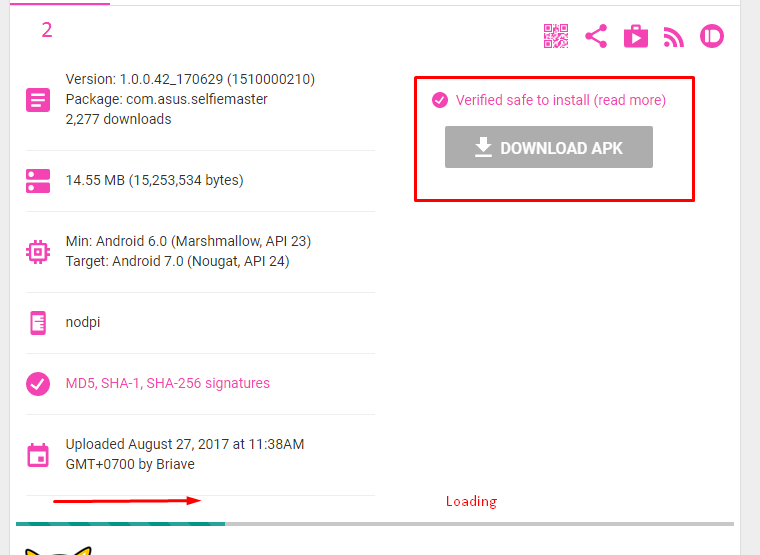
• Cara mendownload :


Contoh kecocokan OS, namun tidak semua perangkat ASUS pula mendukung, jika terjadi ketidakcocokan / crash app, kembalikan ke versi pabrik dan update ke versi yang sesuai di Play Store


1000 Font for Android terbaru
Senin, Mei 23, 2016
 
Instal 1000 sekaligus Font di Android dengan Aplikasi ini

Langsung saja Download Apknya : XDA Power Font (1032) | 65.4Mb | Klik link > Klik Begin Download > Klik Primary Download / Alt link Download |

Jika tidak terbaca font disintem gunakan aplikasi font manager pihak ketika download di : Font Fix | 3 MB |


Tested On Zenfone Laser


Sumber : XDA Forum
Upgrade Samsung, Perhatikan Firmwarenya !!!
Minggu, Agustus 30, 2015

Mencoba Mengupgrade Samsung Ace 2 dari 2.3.6 ke Android 4.1.2 sudah mencoba mengikuti langkah-langkah hasil cari di Google, sebagai berikut :

Cara Upgrade Android 4.1.2 Jelly Bean pada Galaxy Ace 2 GT-i8160

Download Android 4.1.2 XXMC8 Jelly Bean (Europa) atau I8160XXMF2 Android 4.1.2 Jelly Bean (Indonesia) untuk Galaxy Ace 2 GT-i8160 ke komputer kamu. Kamu akan mendapatkan sebuah file tar md5 saat mengekstrak firmware file zip.

Download Odin 3 dan ekstrak file zip
Matikan Galaxy Ace 2 GT-i8160 dan masuk ke Mode Download dengan menekan dan menahan Tombol Home + Power + Volume Down bersamaan. Kemudian tekan tombol Volume  UP untuk terus masuk ke Mode Download
Jalankan Odin pada komputer
Colokkan kabel USB ke ponsel Galaxy Ace 2 untuk menghubungkannya dengan komputer. Sebuah pesan yang mengatakan ‘Added‘ akan tampil di bawah kotak pesan Odin. Kamu juga harus melihat COM port dengan nomor dibagian yang berwarna kuning jika perangkat berhasil tersambung
Catatan : Jika Kamu tidak melihat pesan ‘Added’, kemudian coba port USB lain. Jika itu masih tetap sama silahkan instal ulang driver USB.

Kamu tidak perlu memasukan file .pit, biarkan kosong dan lanjut ke langkah berikutnya
Klik tombol PDA dan pilih file tar.md5, yang telah diekstrak dari file I8160XXMC8 atau I8160XXMF2.
Pada jendela Odin, pastikan Auto Reboot dan F.Reset Time kotak centang yang dipilih.
Klik tombol Start di Odin untuk memulai instalasi
Setelah proses instalasi selesai, Kamu akan melihat pesan ’Pass‘ dengan latar belakang hijau di kotak paling kiri di bagian atas Odin.  Galaxy Ace 2 kemudian akan secara otomatis reboot dan segera Kamu akan melihat logo Samsung. Kamu bisa dengan aman mencabut kabel USB dari tablet untuk melepaskannya dari komputer
Catatan : Jika Galaxy Ace 2 terjebak di booting animasi (setelah langkah-10) kemudian masuk ke Recovery Mode dan melakukan data tugas menyeka dengan memilih wipe data/factory reset, wipe cache partition dan kemudian pilih System Reboot now.

Cara Upgrade Android 4.1.2 Jelly Bean pada Galaxy Ace 2 GT-i8160 telah selesai dan Galaxy Ace 2 GT-i8160 telah berhasil menjalankan Android 4.1.2 Jelly Bean. Pergi ke Setting -> About Phone untuk memverifikasi versi software pada Galaxy Ace 2 GT-i8160 Kamu.


hasilnya nihil, eror :D, coba-coba cek ada yang berbeda Di menu setingan terdapat perbedaan yakni :

About Device (Tentang Perangkat) >>

Based Version (Versi Pita Dasar) : I8160DXMA1

Build Number ( Nomor Versi) : GINGERBEARD.DXMA1

nah tertanya letak perbedaanya di DXMA1, yang merupakan kode nama / versi dari Android yang digunakan. Sedang yang di sebutkan diatas MC8 >> United Kingdom dan MF2 >> Thailand

Untuk mengupgrade Samsung sebaiknya cek langsung di web resminya SAM Mobile
Seperti Samung Galaxy Ace2 yang saya Updgrade DXMA1 merupakan Regional SIN (Singapura)


Jadi Kesimpulanya :
  • Tidak semua yang dishare sama dengan Android yang kita miliki
  • Sebelum mengupgade cek dahulu, versi yang ada pada perangkat Samsung kita dan ketersedian Versi terbarunya di  
~  Sam Mobile ~ Sam Frew  


Untuk cara sama dengan yang saya cari diatas :
Update Samsung Galaxy Ace 2 2.3.6 (Based Version (Versi Pita Dasar) : I8160DXMA1) ke 4.1.2
  • Download Samsung USB driver Dari website resminya Samsung Developers (Tools & SDK)
  • Backup data-data terlebih dahulu seperti phone book, foto, dan file lainya, download aplikasi via Google Play / Samsung Apps dari Samsung, atau via PC dengan aplikasi Samsung Kies, baru lakukan tahap pengupgradetan
  • Download file I8160XXMF2 dari website Sam Mobile ~ Sam Frew  iasanya berupa link ke holinkfile (SIN-I8160XXMF2-20130703111355), extrak

  • Lalu download Odink versi 3.07 , extrak
  • Matikan Galaxy Ace 2nya, masuk ke Mode Download ( - Volume, Home, Power Button) tekan dan tahan secara bersama, kemudian akan diminta menekan tombol + volume untuk lanjut ke Mode Download / atau - volume untuk batal
  • Jalan kan Odinv307
  • Colokkan kabel USB ke ponsel Galaxy Ace 2 untuk menghubungkannya dengan komputer. Sebuah pesan yang mengatakan ‘Added‘ akan tampil di bawah kotak pesan Odin. Kamu juga harus melihat ID:COM dengan nomor dibagian yang berwarna kuning/hijau jika perangkat berhasil tersambung.
Catatan : Jika Kamu tidak melihat pesan ‘Added’, kemudian coba port USB lain. Jika itu masih tetap sama silahkan instal ulang driver USB.
  • Pada Menu Option Pastikan "Auto Reboot" dan "F. Reset Time" harus di ceklis, lalu Klik "Start"
  • Tunggu hingga Muncul tulisan PASS berwarna kuning/hijau biasanya kita hanya akan menunggu sampai menu bahasa muncul

Catatan : Jika Galaxy Ace 2 terjebak di booting animasi (setelah langkah-10) kemudian masuk ke Recovery Mode dan melakukan data tugas menyeka dengan memilih wipe data/factory reset, wipe cache partition dan kemudian pilih System Reboot now.

Bagi Anda yang tidak ingin repot bisa juga menggunakan Samsung Kies Untuk Mendownload dan menginstal Langsung, dengan syarat jaringan yang stabil dan tentunya cepat. Download >> Samsung Kies

Selesai.

Ads 728x90